
How do I download Binance APP on my iPhone? 2026 latest registration tutorial (including overseas Apple ID registration methods)
Don't have an overseas Apple ID? This article teaches you to use your the mainland of China mobile phone number + Alipay Hong Kong, register your own …
Binance App is not currently located in the mainland App Store in China. The Apple ID used by domestic users is bound to the China App Store by default, so the app cannot be found in regular searches. If you want to download the Binance APP, you must use your Apple ID in Hong Kong or other overseas regions.
Many users tend to purchase overseas Apple IDs through a certain treasure platform, but such accounts have multiple hidden dangers: on the one hand, the password may be reset by the original owner, on the other hand, the App cannot be updated independently, and more importantly, account security is completely controlled by others. Due to this problem, I once encountered login failure after only using the purchase account for two months.
This tutorial will systematically guide you through the complete process from registering for Hong Kong Apple ID to downloading Binance App, registering an account, and completing KYC certification.
[[KEEPIMG_0]
1. Complete the installation of Alipay Hong Kong version in advance
. On the premise of maintaining the current Apple ID login status in the mainland of China, search for "Alipay Hong Kong" in the App Store and download and install the application.

This step is crucial. Completing payment verification preparations in advance can avoid payment obstacles in subsequent operations.
2. Exit the current Apple ID login status
After the Alipay Hong Kong download is completed, you need to exit the current Apple ID first and make the App Store enter an unregistered state before creating a new account.
In particular, there are differences in how to log out of the current Apple ID: For users using iOS 26, when swiping down on the App Store profile page, the log out button will not be displayed directly, and this function will be hidden in other settings.
The specific operation process is as follows:
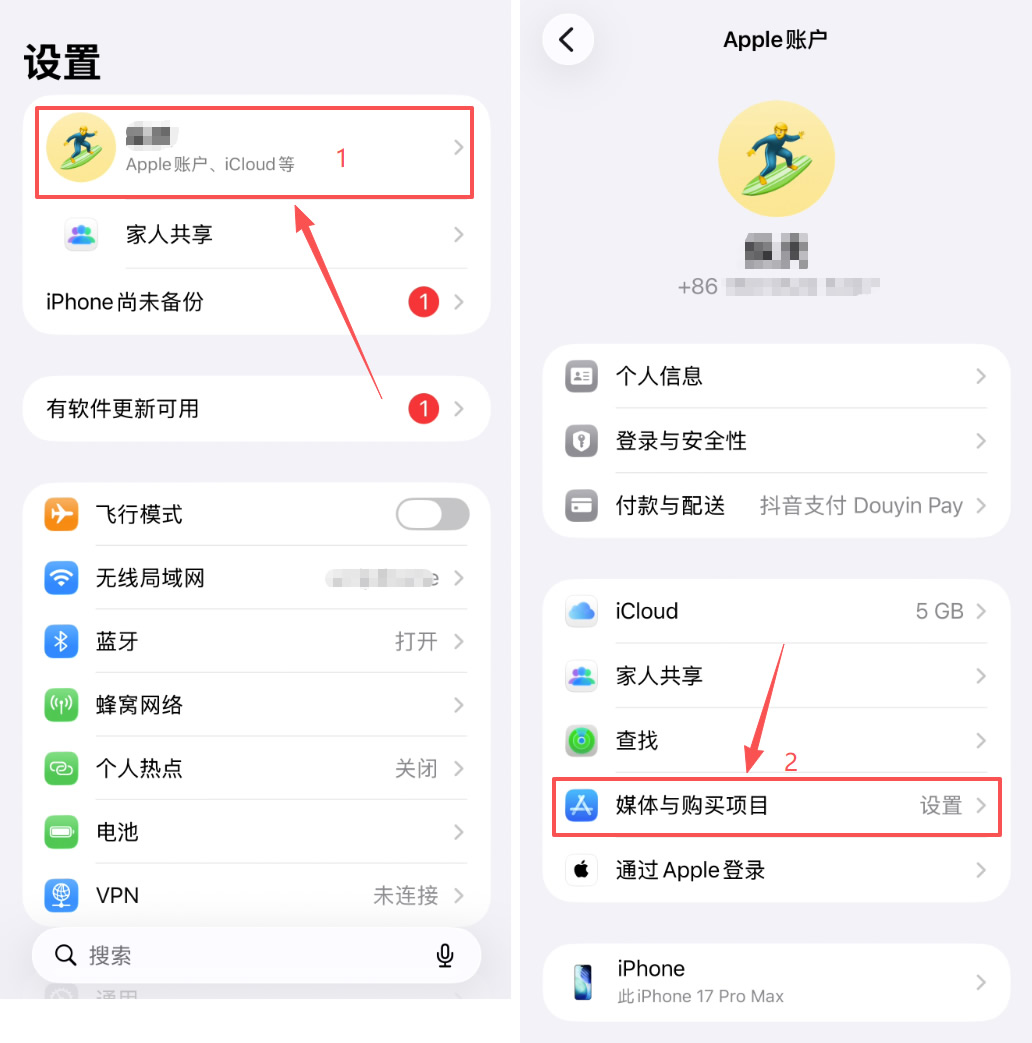
Open [Settings] on the Apple phone, click the Apple Account and iCloud options above. After entering the Apple account page, find the [Media and Purchase Items] function module,
 ,
,
locate in this interface and click the "Log Out" button, and follow the prompts to complete the confirmation operation.
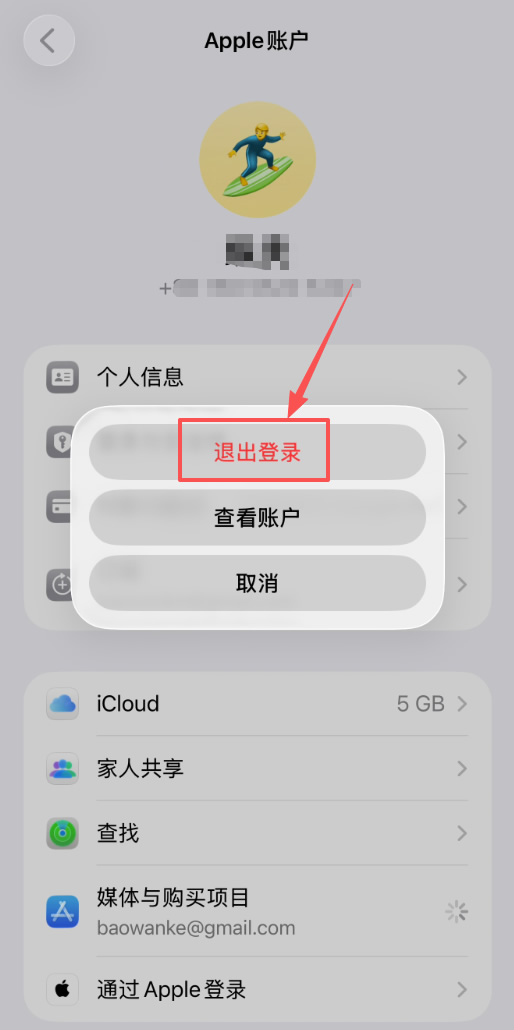
After successful exit, the App Store interface will display a status of not being logged in, and the process of creating a new account can proceed.
3. Creating a new overseas Apple ID operation tutorial in the App Store
At present, the risk control mechanism for Apple account creation has been upgraded to the highest level. A large number of users register through the website, causing abnormal system recognition, thus facing the risk of their accounts being restricted or blocked.
It is recommended to register a new overseas account directly through the App Store. This method can effectively circumvent system detection.
Operation steps:
1. Launch the App Store application, click on your avatar in the upper right corner, and select the "Create Apple Account" option. The success rate of registering through this portal will be significantly improved.
[[KEEPIMG_4]
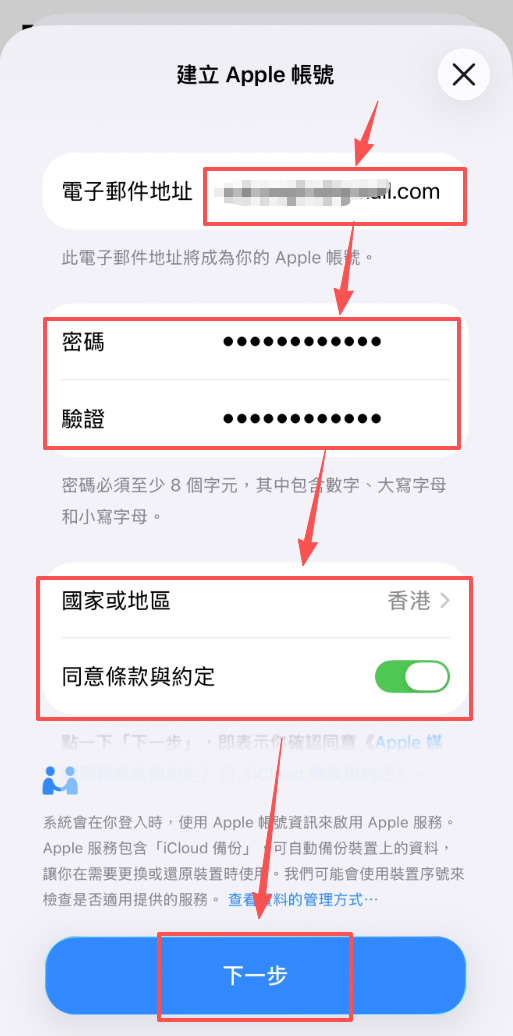
2. After entering the registration page, you need to fill in the information according to the following specifications:
① Email: It is recommended to use QQ email, and other email addresses can also be used as alternatives.
② Password: Please strictly follow Apple password requirements and repeatedly enter the Captcha that meets the strong password standard.
③ Countries and regions: Select "Hong Kong" as the registration region, avoid using the Taiwan option, confirm the agreement to the Terms of Service and click "Next".
④ Name: real name is required. It is recommended to use Zhang Wei, Zhang Jie and other non-obvious fictitious names.
③ Date of birth: Ensure that the age meets the registration requirements for over 20 years old.
④ Click [Next]

The reason why Hong Kong is preferred when registering is that when the system triggers the payment verification link, the Alipay Hong Kong account can be used to complete the verification process, while Taiwan lacks corresponding alternative payment channels.
4. How to operate this step of payment verification?
In the entire registration process, payment verification is the core link that determines the success or failure of registration, and it is also a key node where most users encounter obstacles.
Some users may see the "None" option in the payment verification session. After selecting it, they can skip the step of binding payment methods. However, most users still need to complete the payment verification process before continuing.
Users need to select Alipay Hong Kong in the payment verification session, and then click the "Please Go to Verification" button. If you don't already have an Alipay Hong Kong account, you need to complete registration first:

First launch the pre-downloaded Alipay Hong Kong application.
In the mobile number selection area, make sure to select "Mainland China"(+86) and enter a valid mainland mobile number.

Then set the login password and complete the account registration process.

After logging in, select the identity of "I am a mainland resident".
Then enter the binding page and select "Mainland Savings Card" as the verification method.

Enter the bank card number, expiration date, security code and English name information to submit a verification application.
 After
After
the system prompts "Mainland savings card connection successful", the verification process of Alipay Hong Kong account will be completed.

After completing verification, return to the App Store registration page and click the "Connect Verification" option to pop up the automatic authorization interface and select "Confirm" to complete the authorization.

5. How to fill in the Hong Kong address and mobile phone number?
When filling in payer information, you need to provide the street address. Users can search for "Hong Kong Address Generator" through Google, enter any reliable link to generate a real Hong Kong address, copy and paste it, and fill it in simplified Chinese.It is necessary to pay attention to itthat it is strictly prohibited to fabricate address information. False addresses may cause direct interruption of the registration process. AI tools can also be used to generate address content that meets specifications.

Regarding the mobile phone number field, the system displays the Hong Kong number format by default, but users can manually adjust it to:
Click the country/region code, search and select the "+86" option corresponding to "the mainland of China" to
enter your mainland mobile phone number.
Complete the verification of the mobile phone verification code and email Captcha
and wait for the Apple system to complete the account registration process
.
After the registration is completed, the App Store interface will automatically switch to Hong Kong, and the page language will be displayed in Traditional Chinese. This indicates that the Hong Kong Apple ID has been successfully created.
6. How to find and download Binan in the Hong Kong App Store?
After logging in to Hong Kong's Apple ID, enter "Binance" or "Binance" directly in the App Store search field.
In the search results, the first entry is advertising content, which can be ignored and the second official application is selected for download.
In addition, you can also download other mainstream compliance exchange applications at the same time: Ouyi OKX: Recommended download channels

7. Binan APP registration process instructions After
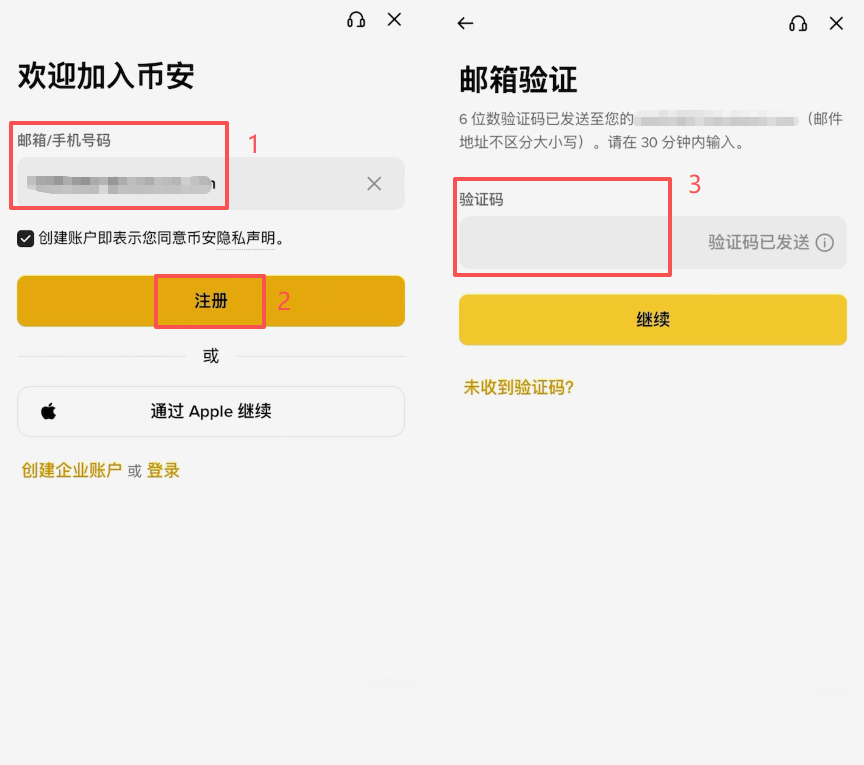
installing Binan APP (official registrationofficial download), enter the application registration interface:
1. Select email or mobile phone number for registration method. The mobile phone number in the mainland of China can be directly used
2. Taking email registration as an example, fill in the email address and click the "Register" button
3. Get and enter the email verification code
4. Set the account login password
5. After completing the registration, the system will ask" whether you have an inviter"
6. Click the' Yes' option and fill in JBZJ20 in the invitation code input box.
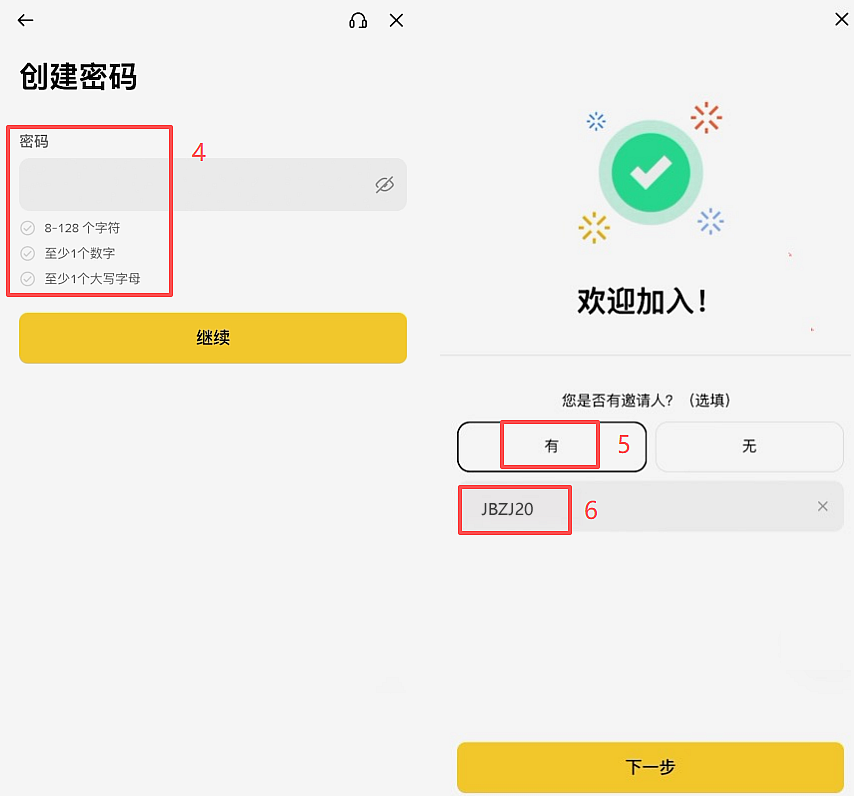 Registration is completed
by entering the invitation code JBZJ20, and 20% of all subsequent transaction fees will be permanently refunded. Holding an account for a long time will save a lot of costs. If you don't fill it out, you will directly miss out on this offer.
8. Binance KYC Identity Authentication Filling Guide
After completing the invitation code, the system will automatically guide to the identity authentication interface.There is a key point here that is easy to ignore, and special attention should be paid to:
the fields of country/region of residence and country/region of certificate issuance must be filled in as "China." Even if you are currently in Canada or the United States, you should choose China as your country; don't mistakenly choose Hong Kong because your Apple ID is bound to Hong Kong. After selecting China correctly, spot, contract and financial management functions willbe fully unlocked without any restrictions.
The subsequent operation process is as follows:
1. Select "ID Card" in the ID Card Type option, and click to enter the next step.
2. Select the "Upload ID" or "Photo ID" function according to the system prompts.
[[KEEPIMG_19]
3. Upload photos of the front and back of your ID card in turn.
4. Perform Face Recognition Verification: Please remove your glasses and hat, place your face completely into the recognition box, and follow the instructions to complete actions such as blinking, nodding or shaking your head.
[[KEEPIMG_20]
5. Check and confirm personal information: including nationality, name and date of birth, and must be completely consistent with the records on the ID document.
6. Click the "Continue" button, and the system will ask for the current working status, and you can choose one at will.
7. After submitting the application, you need to be patient and wait for the review results.
[[KEEPIMG_21]
9. What security options can be prioritized during the review period?
After the KYC certification is submitted, it will enter the review process. It is recommended to improve the account security settings during this period. Click the three horizontal bar icons in the upper left corner → enter the "Personal Data" page → select the "Account Security" module.
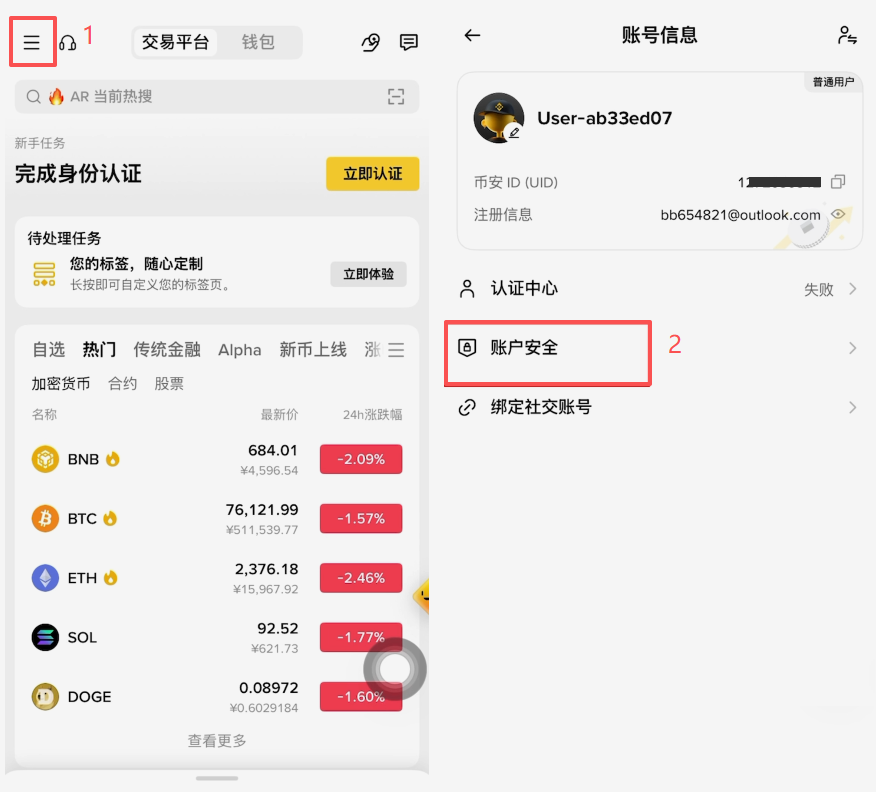
It is recommended to complete the following security settings one by one:
Email binding: If you have used your email at the time of registration, the setting will automatically complete your
mobile phone number: It is recommended to carry out additional binding. If you have an overseas mobile phone number, you should be given priority. If you don't have it, you can also use a mainland mobile phone number. The security score can be increased from 90 points to 95 points
. Password: It is recommended that you must activate
it 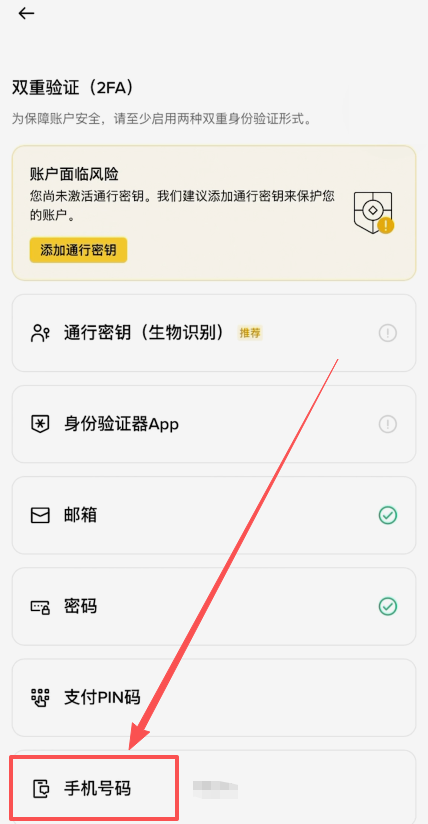
10. What is the password and why must it be activated?
The essence of the passkey is to bind the facial information to the Binance account, generate a corresponding key pair, and store it in the underlying system of the mobile phone.
After being enabled, all high-risk operations involving fund transfer and transfer need to call this key verification, that is, identity verification needs to be confirmed through Face Recognition. This means that even if your phone is lost, others cannot manipulate your account assets without authorization.
The opening process is simple: Go to the account security page to find the "Access Key" function, click Add and verify it through Face Recognition. The system will automatically save it to Apple's mobile phone password manager. The whole process takes only a few seconds.
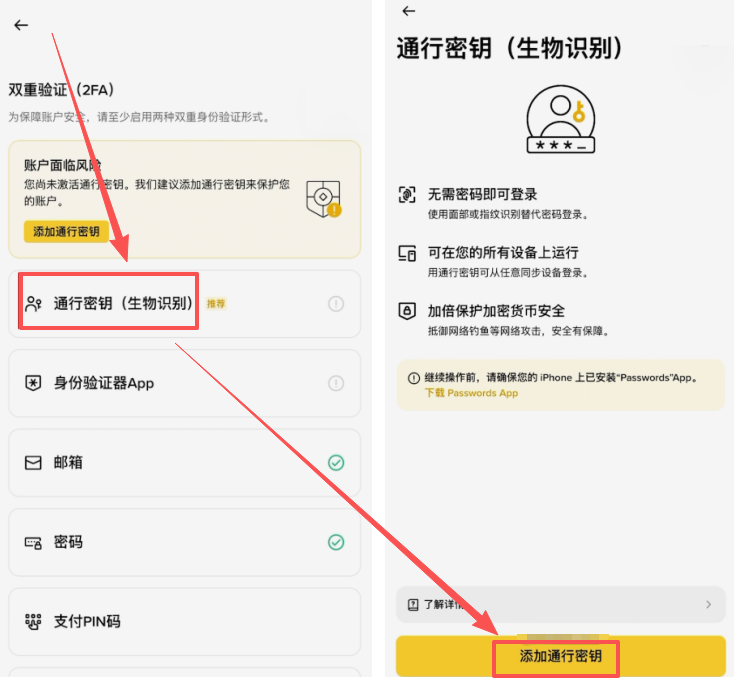
FAQ
Q: When registering Hong Kong Apple ID, what should I do if the "Alipay Hong Kong" option does not appear in the payment verification process?
A: Different devices and network environments may cause differences in option display. If the "None" option appears in the interface, you can directly select this option as the most convenient solution. When neither "None" nor "Alipay Hong Kong" is displayed, it is recommended to try switching network environments (such as shutting down VPN or replacing network nodes) and then re-perform the registration process.
Q: How long can Binance KYC be approved after submission? Can it be used before approval?
A: Reviews are usually completed in minutes to hours, but may take longer during peak trading periods. During the KYC review process, users can still log in to their accounts, but the withdrawal function will be limited. In order to avoid inconvenience in subsequent operations, it is recommended to give priority to completing the KYC process before recharging.
Q: My Alipay Hong Kong is bound to a mainland savings card. Will it affect the security of my bank card?
A: Such operations will not pose additional threats to account security. Alipay Hong Kong binding of mainland savings cards is only used for identity verification purposes. It is essentially the same as regular Alipay binding operations and will not grant any active debit authority to third parties.
The above content covers the complete process for Apple mobile phone users to download Binance APP, as well as the overseas Apple ID registration methods involved in the latest registration tutorial in 2026. For more information about the download and registration of Binance Apple APP, please pay attention to other related articles in Script House!
Disclaimer: This article is only to provide market information. All content and opinions are for reference only. They do not constitute investment advice, nor do they represent the views and positions of this site. Investors should make decisions and trade independently. The author and this website will not bear any responsibility for the direct or indirect losses that may be caused by trading activities.!