Gate.io Not Working or Website Not Loading? DNS and Route Fixes (2026)
Gate access problems come in three shapes: the page will not load, the site loads but you are blocked after login, or the app shows a blank screen. Th…
Gate (gate.com; the platform used to be reached at gate.io) is one of the older exchanges and an easy one for newcomers — but it has its own access quirks. Long-time users still remember the gate.io domain, newer users search the Chinese nickname, and in some regions the network itself is restricted — which is how "Gate.io not working" happens. This guide follows the same real troubleshooting order: check the official announcement page first to rule out a platform-side outage, then a 30-second split between a local route problem and an account problem, then DNS, cache and route-level fixes.
1. Check the official announcement page first
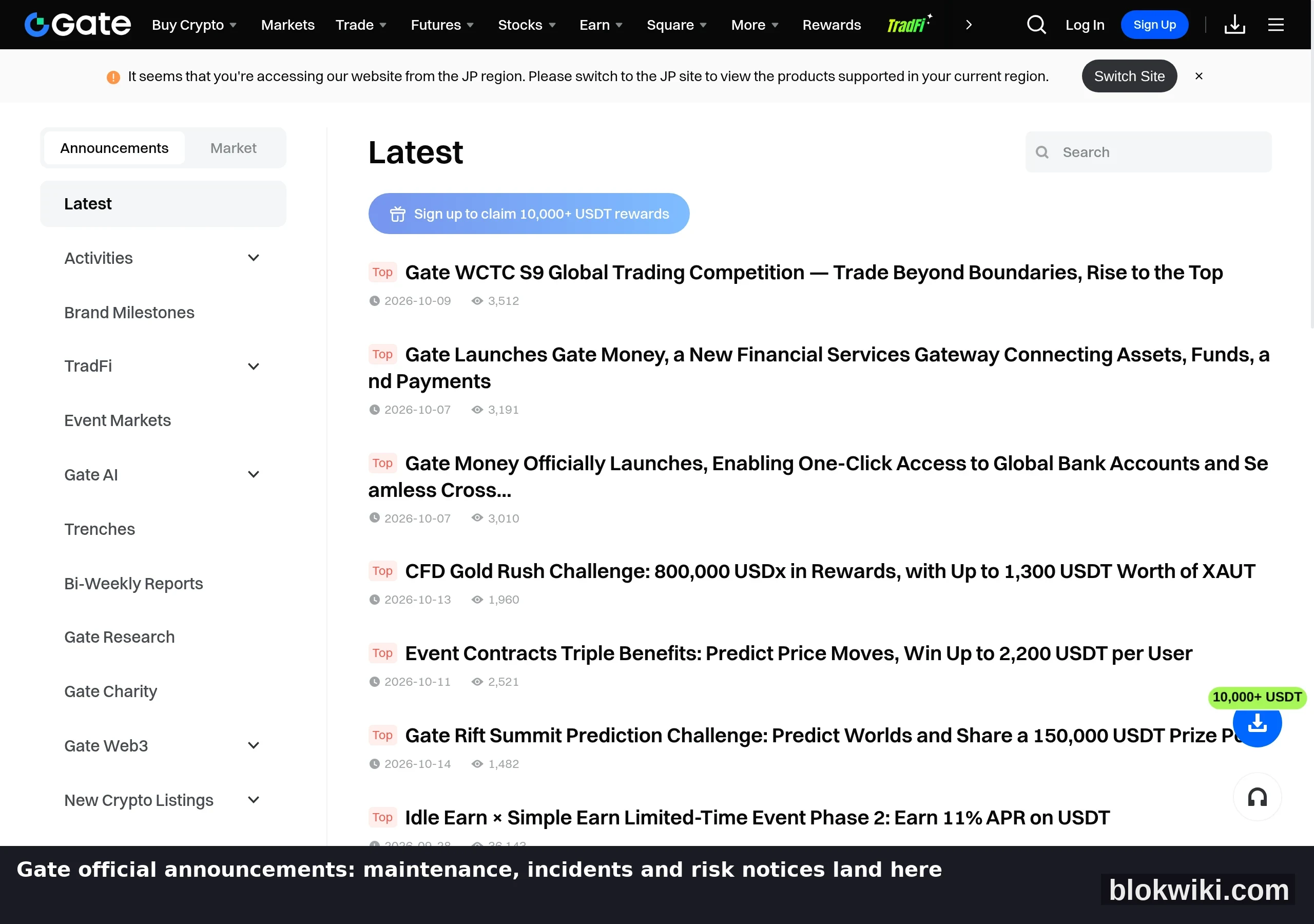
Gate publishes maintenance and incident information on its official announcements page (the real page is below):
- There is a current maintenance or incident notice: that is a platform-side issue — wait for the time given in the notice. Do not deposit or place orders during maintenance, and never trust "internal channel" messages;
- The page is clean and you still cannot get in: the problem is on your side — work through the next two sections;
- The notice covers regional restrictions or compliance changes: these notices name the affected scope and usually list the affected features and the alternatives.
gate.io to gate.com: how dead old links show up
- Old domains and saved bookmarks will not open: Gate has consolidated its main site on gate.com, so gate.io links saved years ago may fail or redirect oddly — verify you are on the current official domain first;
- The homepage opens but you are bounced to a regional site or shown a restriction: a regional access restriction;
- Everything works except KYC or withdrawals: account side, not a network problem;
- Wealth, quant or StartDAO modules will not open: these are separate in-site modules with their own entry points, not the same access path as the main site — do not read that as "the exchange is down".
Gate's announcements page beats a status page
Gate has no usable public status page (/status returns 404), so maintenance and incident information goes to the official announcements page, which is published in Simplified Chinese, Traditional Chinese and English — reading it first saves half your troubleshooting.
2. A 30-second test: networks, domains, account side
- Switch networks: move between Wi-Fi and mobile data and retry. If it opens, your original route was the problem;
- Verify the domain: only the official domain gate.com. The earlier gate.io domain still circulates in old links, and look-alike sites in search ads are the main phishing channel — see our guide to spotting fake exchange sites;
- Check whether it is the account side: if the page opens but you are blocked after login, or asked to submit documents or appeal, that is account-level risk control. Follow the on-page steps — retrying login does not help.
3. Two things you can fix locally: DNS and cache
3.1 Switch to a public DNS resolver
"It worked yesterday, not today" is most often a DNS resolution failure. Change your DNS to 1.1.1.1 or 8.8.8.8: on Windows, Network adapter → IPv4 properties; on macOS, System Settings → Network → Details → DNS; on mobile, in the Wi-Fi details screen. Then disconnect and reconnect.
3.2 Rule out cache and extensions with an incognito window
If an incognito window opens the site but your normal window does not, it is cache or extensions — ad and script blockers most often break exchange verification scripts, which shows up as a page that half-loads and hangs. Clear the cache once, or disable extensions one at a time.
A Gate app that will not open is a separate problem: blank screens and crashes are usually an outdated build, and not finding the app in your store is usually a regional-store issue. It has nothing to do with the website not loading, so do not mix the two.
Gate in-site modules (Wealth, quant, StartDAO) are not on the same origin as the main site — when a module fails, confirm DNS health with the main site first instead of changing routes.
4. If it is a regional or route restriction: separate the cases first
Gate is a regional access restriction; but before choosing a route, rule out the two false alarms above — dead old domains and broken in-site modules.
Judge a route on four criteria only: a public status page, an explicit no-access-log commitment, support for the devices you use, and transparent billing. The full method, plus a real sign-up walkthrough with screenshots (the invite code fills itself in), is in Blocked exchange? How to choose a route — this article no longer repeats those images.
Compliance note: follow the laws and platform terms that apply where you are, use any route only for ordinary market data and trading access, and never for anything unlawful.
5. Verifying the route works
- The full market list loads, not just the skeleton — so API requests are getting through;
- Login works, and deposit and order pages open;
- Stay on one city's node: an account whose IP hops between countries within minutes is the classic trigger for unusual-login flags and temporary withdrawal holds;
- For sensitive actions such as withdrawals or password changes, return to your original network where possible. See our Gate exchange page; access fixes for other platforms are in our Binance guide and OKX guide, and withdrawal or account issues are covered in our OKX withdrawal troubleshooting guide.
On Gate, spot order placement and the Wealth/quant modules must be verified separately before you call a route usable; their entry points differ from the main site, so market data alone misleads.
6. FAQ
Everyone else can open it, only I cannot?
Then it is your device or your ISP's route — work through section 3. Only if both a different network and a different DNS fail should you consider a route service.
Is "Gate" the same as the Chinese nickname people use?
Yes — one platform. Gate is the official brand; the Chinese community still uses its older nickname, and the platform used to live at gate.io before consolidating on gate.com. Both names lead to the same entry, so just confirm you are on the official domain.
Will an acceleration route get my account banned?
No tool alone gets you banned, but frequent IP hopping triggers risk controls. One fixed node, and no region-switching across several devices, keeps it low.
The announcements page is clean and I still cannot open it — what now?
Work through section 3 in order: another network, another DNS, an incognito window, another device. Once you have confirmed a regional access restriction, choose a route using the four criteria in section 4.
A gate.io link I saved will not open — is the platform down?
Check the domain first: Gate has consolidated on gate.com, so an old gate.io bookmark failing is expected. Update the bookmark to the current official domain and retry.
Risk Notice
Risk Notice & Affiliate Disclosure: this article contains affiliate links — signing up through them may earn us a commission at no extra cost to you, and it does not affect the criteria above. Trading and holding crypto carries a risk of capital loss; if you use any network acceleration service, follow local laws and the provider's terms, and assess privacy and compliance risks yourself. Screenshots reflect the live interface in October 2026; features and layouts may change, so follow what you see on your own device. Exchanges and services mentioned are for information only and are neither investment advice nor an official recommendation.