How to Choose a Route for a Blocked Exchange: Four Criteria (2026)
An exchange that will not open is one of three things: a regional access restriction, an account restriction, or a local DNS/cache problem — and a rou…
When an exchange stops opening, the reflex is to grab whichever tool connects fastest. But what actually decides whether it works is not the brand — it is whether the route is stable, log-free, supported on the devices you use, and billed transparently. This is the shared companion piece to our exchange-access series: the four criteria in full, plus a real sign-up walkthrough so you can verify any provider yourself. Per-exchange troubleshooting is linked at the end.
1. First, identify which kind of restriction you are facing
All three are called "it will not open", yet they behave completely differently — a route only helps with the first:
- Regional access restriction: users in the same region broadly cannot open it (page fails to load, connection times out, or you are redirected to a regional site). This is a network-layer problem, and a different route fixes it;
- Account restriction: the page opens, but after login you are asked to appeal, submit documents, or shown a risk message. This is account-side, and a route will not help — follow the on-page steps;
- Local environment problem: DNS resolution failure, browser cache, or an interfering extension. You can self-test this with a different DNS (1.1.1.1 / 8.8.8.8) and an incognito window.
Step-by-step troubleshooting per exchange: Binance, OKX, HTX, Gate. Once you have confirmed the first case, read on.
2. Judge a provider on four criteria only
2.1 Is there a public status page?
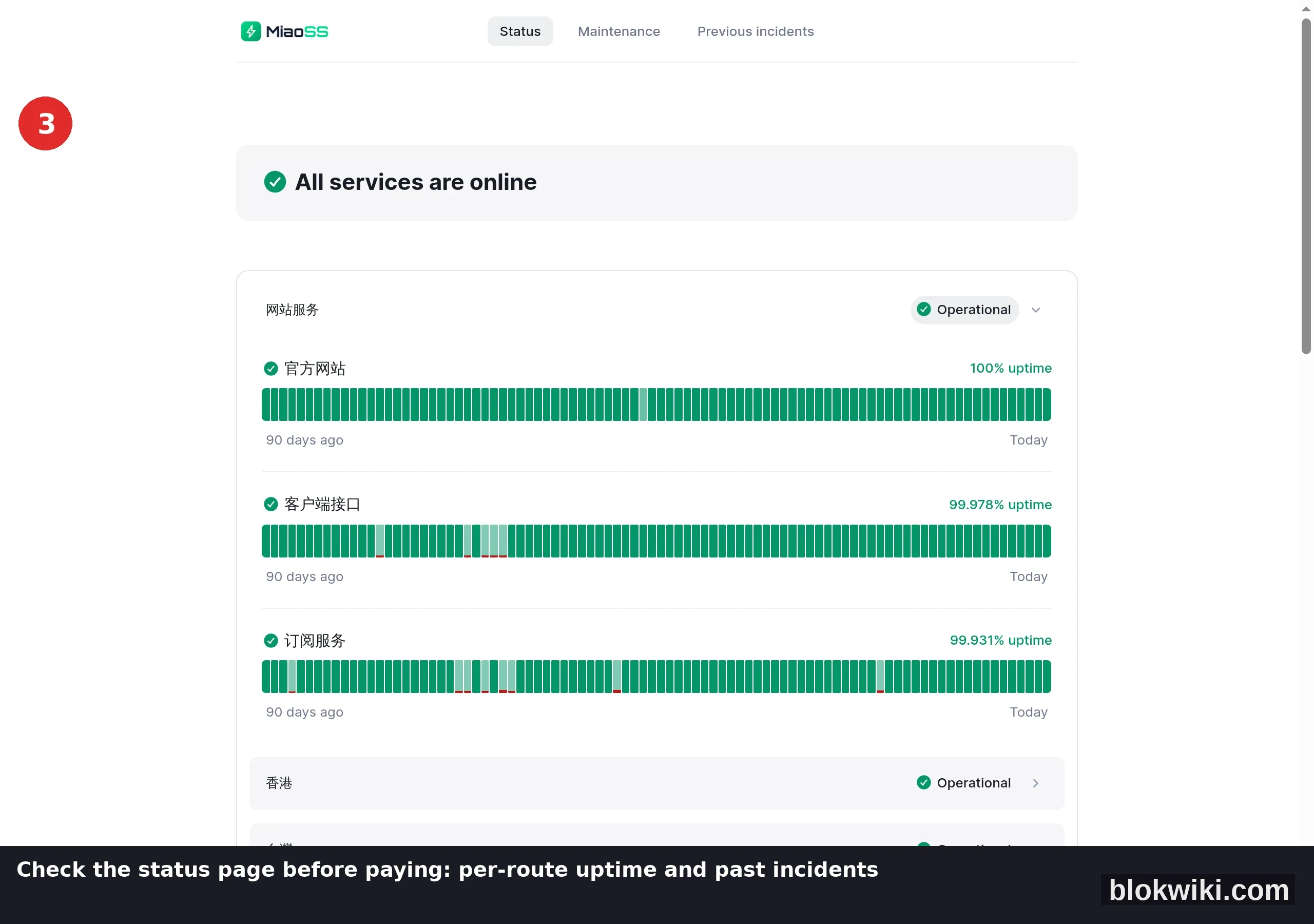
This is the hardest criterion: a status page discloses per-route uptime and past incidents, which means the operator is willing to show real numbers. A provider with no status page and one line claiming "99.9% uptime" leaves you unable to tell whether a failure is your network or theirs.
2.2 Is there an explicit no-access-log commitment?
Read the privacy policy and terms for two things: whether access logs are explicitly not retained (no-log), and what data is kept and for how long. When an exchange account and funds are involved, vague wording is equivalent to no commitment at all.
2.3 Does it support the devices you actually use?
Desktop browser, phone, router — most people need at least two. A provider that works on a single platform, or needs manual tinkering, is expensive to live with.
2.4 Is the billing transparent?
Check three things: data-based or time-based, whether speeds are capped, and what happens when you go over. "Unlimited" with a speed cap and no clear overage rule is usually the most expensive option.
Conversely, do not treat these as selection criteria: cheap or free (free services are usually monetised through ads or data — see the risks below), a large node count (quantity says nothing about quality), or absolute claims such as "never throttled, never blocked".
3. A real sign-up walkthrough: from the landing page to the status page
Below is a walkthrough using MiaoSS — follow the same three steps to assess any comparable provider.
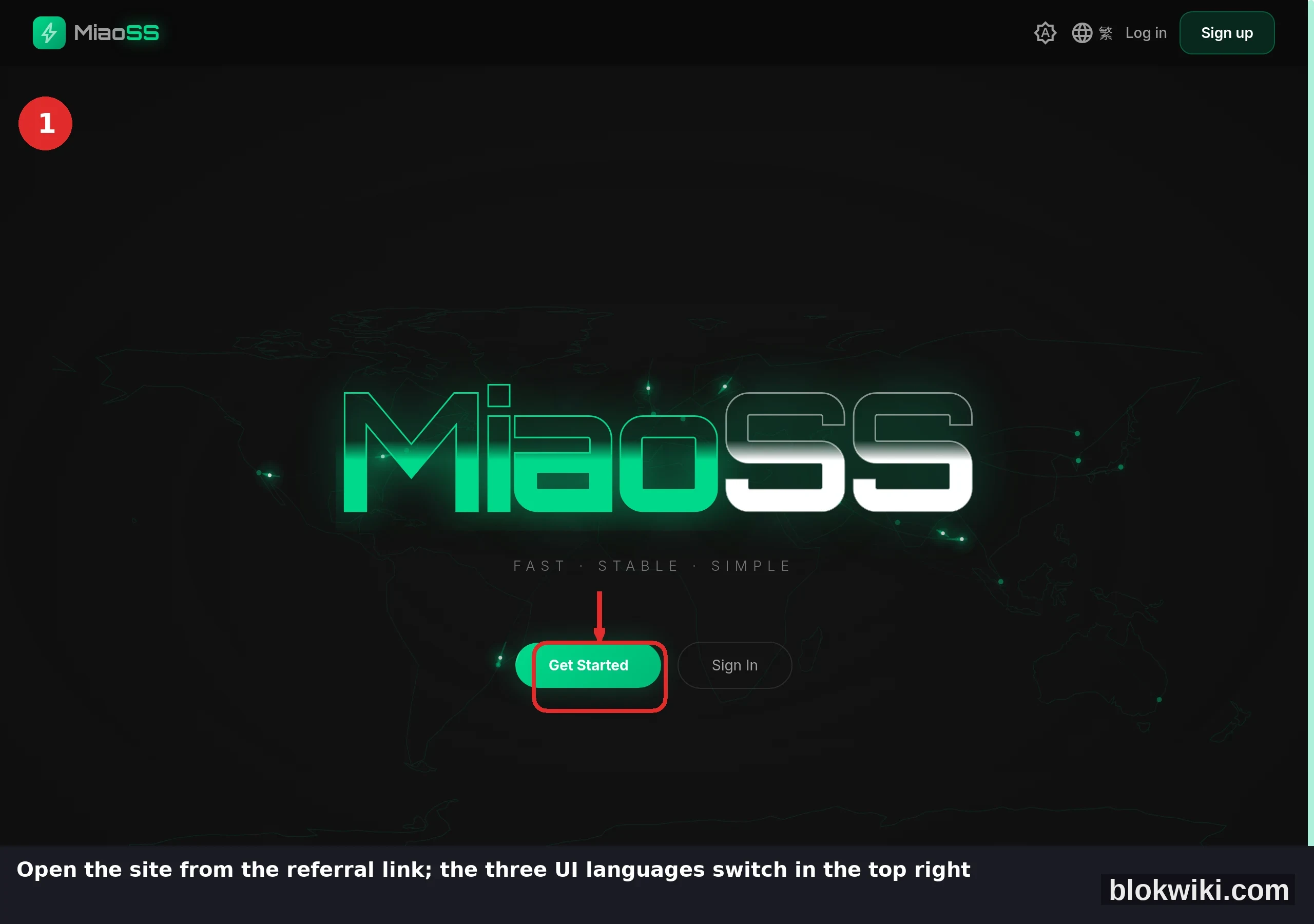
① Open the official site: verify the domain and never enter through a search ad or a link posted in a group chat (the landing page below is real; the interface switches between Simplified Chinese, Traditional Chinese and English in the top right):
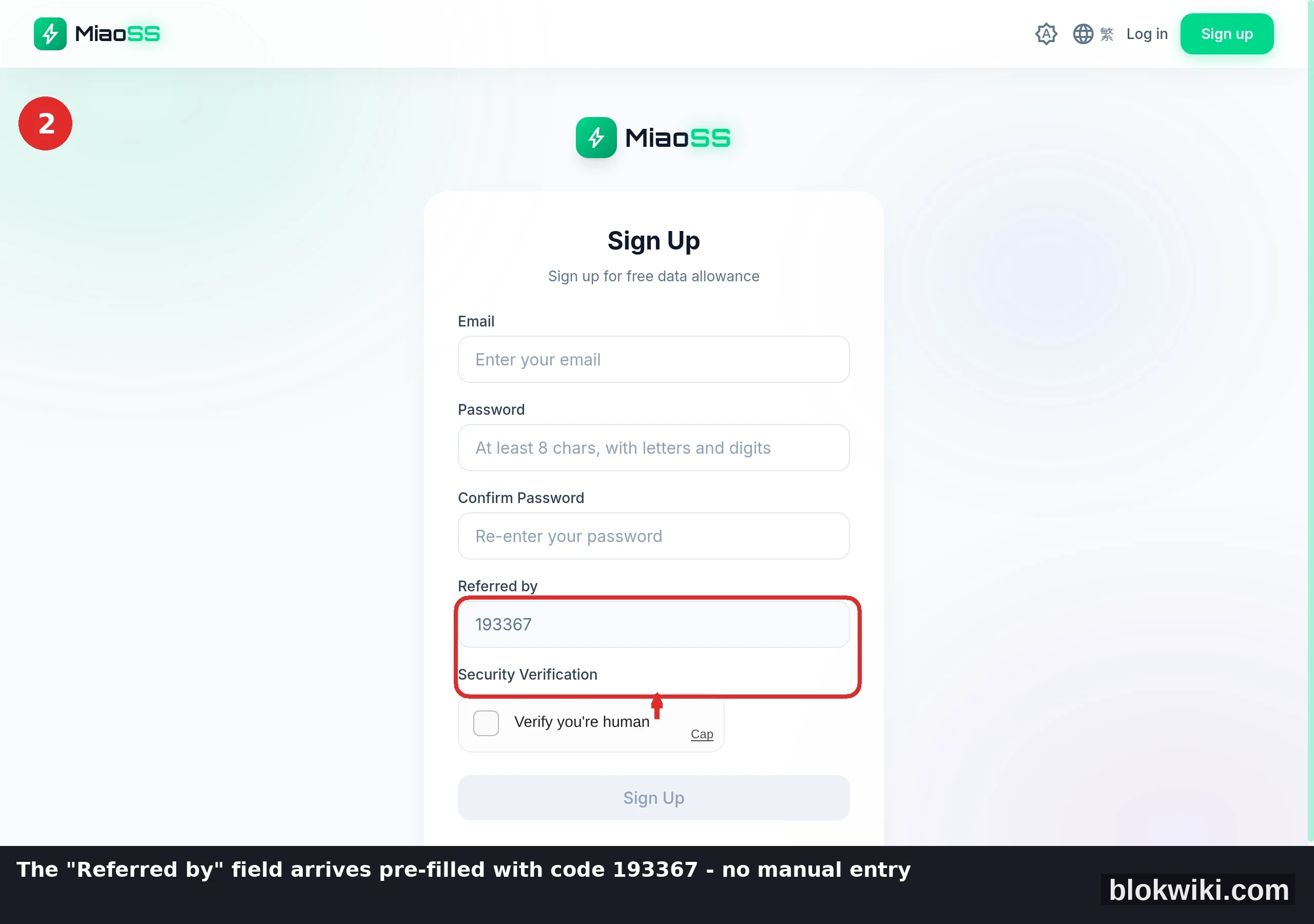
② Read the sign-up page: two things matter — how restrained the required information is (an email, a password and one human check; no phone number or ID document, which have nothing to do with connecting), and whether the "Referred by" field is filled from the invite link (193367 in the screenshot is this article's code). The page states that new accounts get free data allowance, so you can test the route before paying:
③ Check the status page before paying: this is the evidence for criterion one — per-route uptime and past incidents are visible at a glance (the real page below showed 99.978% uptime for the client API on the day of writing):
This article's referral entry: MiaoSS registration (code applied automatically). Whether to use it, and which provider, is your call based on the four criteria above — this is not a recommendation.
Compliance note: follow the laws and platform terms that apply where you are, use any route only for ordinary market data and trading access, and never for anything unlawful. If such services are not permitted where you live, do not use them.
4. Three traps that catch most people
- The three risks of free tools: traffic interception that injects ads or phishing pages, retained access logs, and clients bundled with malicious code. The first two threaten your exchange account directly; the third threatens the device itself;
- Node hopping: an account whose IP jumps between countries within minutes is the single easiest pattern for an exchange's risk engine to flag — it can trigger unusual-login notices and temporary withdrawal holds. Pick a route, then stay on one city's node;
- Mistaking "it connects" for "it works": a page that loads is not a platform that works — market data, login and order placement run over different paths, so verify each one.
5. Verifying the route actually works
- The market list loads in full, not just the first-screen skeleton — that means API requests are getting through;
- You can log in, and deposit and order pages open;
- Placing, cancelling and reviewing orders all work;
- Use it for two or three days before judging stability, and never buy a long plan on the strength of one successful attempt.
6. FAQ
Should I start with a long plan or a short one?
Start with the free allowance or the shortest cycle: get market data, login and order placement working first, then consider a longer term. Every provider looks fast during a promotion — stability is what you judge on ordinary days.
Can one route serve both the exchange and everyday browsing?
Yes, but keep trading-related access on one route and one node so you minimise risk-control triggers on the account side.
What if the route suddenly gets slow?
Check its status page for maintenance or an incident first, then decide whether to switch to a backup node in the same city. Do not jump between multiple routes repeatedly.
Risk Notice
Risk Notice & Affiliate Disclosure: this article contains affiliate links — signing up through them may earn us a commission at no extra cost to you, and it does not affect the four criteria above. Trading and holding crypto carries a risk of capital loss; if you use any network acceleration service, follow local laws and the provider's terms, and assess privacy and compliance risks yourself. Screenshots reflect the live interface in October 2026; features and layouts may change, so follow what you see on your own device. Services mentioned are for information only and are neither investment advice nor an official recommendation.