Binance Agent ID Guide (2026): How to Claim a .ai Name, Bind Agentic Wallet and Receive Payments
A step-by-step, screenshot-based guide to Binance Wallet's Agent ID: claim a .ai name, bind an Agentic Wallet, pay BNB Chain gas and use the name as a…
The short version: an Agent ID is a wallet name, not a token
On 20 October 2026, Binance Wallet rolled out Agent ID: a short identifier ending in .ai that can be linked to your Agentic Wallet and then used directly as a wallet address. In the screenshots below, blokwiki.ai resolves to the full BNB Chain address 0x5165…5bb. Instead of checking a 42-character hex string, the sender types a name.
Claiming is free during the launch period and works on a first-come, first-served basis. The naming rules are simple: 3–15 characters, lowercase letters and numbers only. There are only two real prerequisites: an Agentic Wallet, and at least 0.0001 BNB in it to pay the minting gas on BNB Chain.
- Who it is for: people who regularly receive funds in Binance Wallet and want an address that is easy to remember and verify, or who plan to let an AI agent execute on-chain actions;
- Who it is not for: spot-only traders who never touch an on-chain wallet;
- The biggest pitfall: Agent ID resolution currently works inside Binance Wallet. Most exchange withdrawal forms only accept a 0x address, and you should not assume the name works across other chains.
1. What an Agent ID actually is
Binance's own description is direct: One name for payments and identity. It is not a new chain, not a new token, and it does not move your assets anywhere. Your funds still sit at the on-chain address of your Agentic Wallet; the Agent ID simply replaces the address with a name.
Public reports say the feature was built with domain provider SPACE ID and uses the .ai suffix. Binance co-founder Yi He announced it on 20 October 2026, with free claims and limited availability during the launch. Features, regional availability, limits and fees can change between app versions, so treat what you see in the app and official announcements as the final source of truth.
2. Three terms you should not mix up
| Term | What it is | What matters |
|---|---|---|
| Agent ID | A short name ending in .ai | 3–15 lowercase letters or digits; linked to one wallet address; used for payments and identity |
| Agentic Wallet | An isolated sub-wallet inside Binance Wallet | Separate balance; keyless design; lets you authorise an AI agent within limits |
| Secure Auto Sign | Automated signing permission | Removes per-transaction confirmation; constrained by spending caps, token allowlists and an address book |
One sentence: Agent ID is the name, Agentic Wallet is the account, and Secure Auto Sign defines how much you let an AI spend without asking you.
3. What to prepare before claiming
- An up-to-date Binance app: the entry point is in the carousel on the Wallet home screen. Older versions may not show the card at all.
- Completed identity verification (KYC): some wallet features may be unavailable without it. For document requirements and rejection cases, see our exchange KYC comparison and rejection troubleshooting guide.
- An Agentic Wallet: if you do not have one yet, the claim flow will guide you through creating it.
- At least 0.0001 BNB on BNB Chain: this pays for minting the Agent ID. Keep a little extra for future transfer fees.
If you do not have a Binance Wallet yet, you can open one through our Binance Wallet referral link, finish KYC, and then follow the steps below. Registering through the link does not cost you more, but it may earn this site a commission.
4. The full flow in 9 steps, with English screenshots
Step 1: Find the Agent ID banner on the Wallet home screen
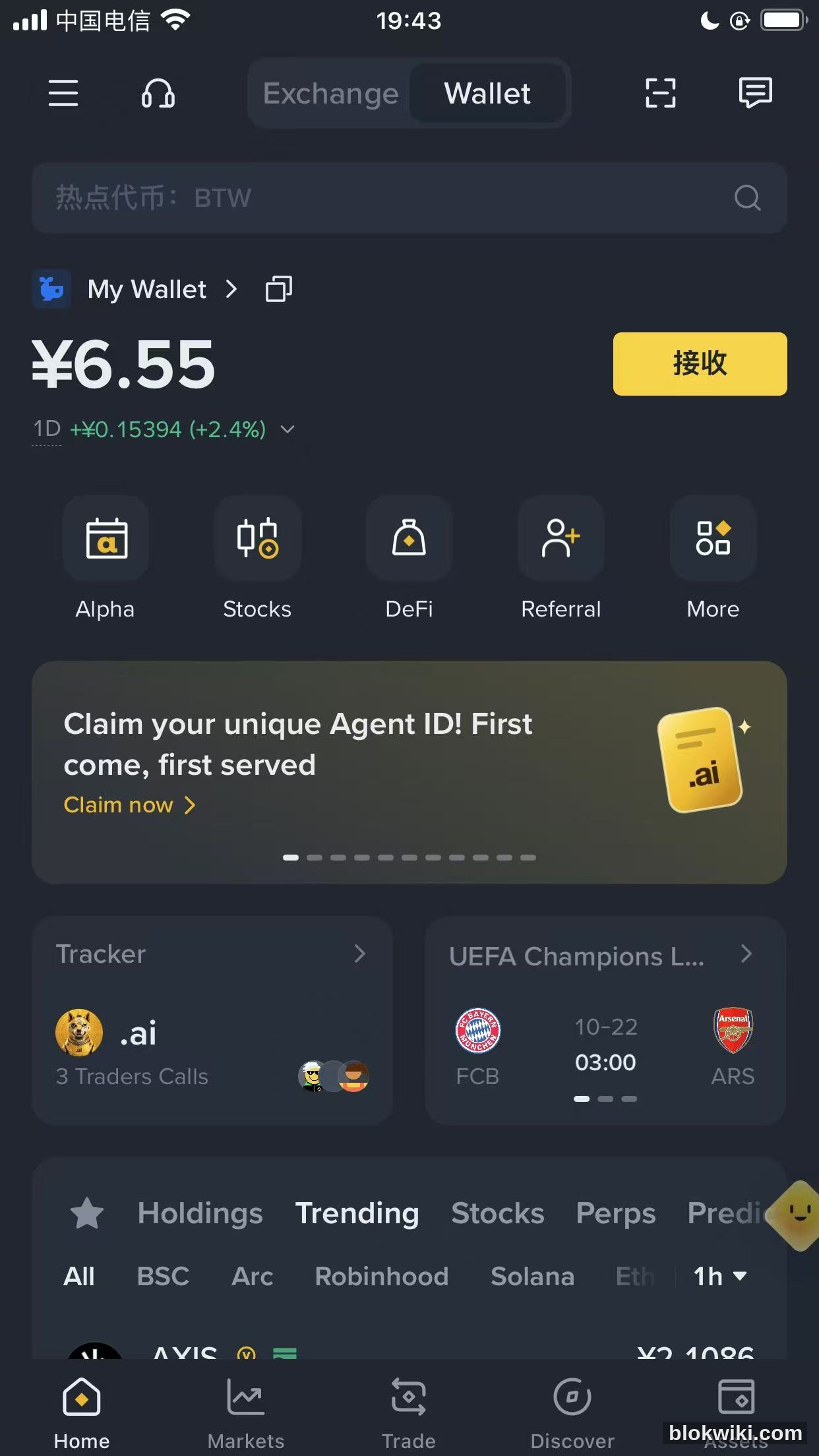
Open the Binance app and tap Wallet at the bottom. The home carousel shows a gold card: Claim your unique Agent ID! First come, first served, with a Claim now link.
Step 2: Open the “Reserve your Agent ID” screen
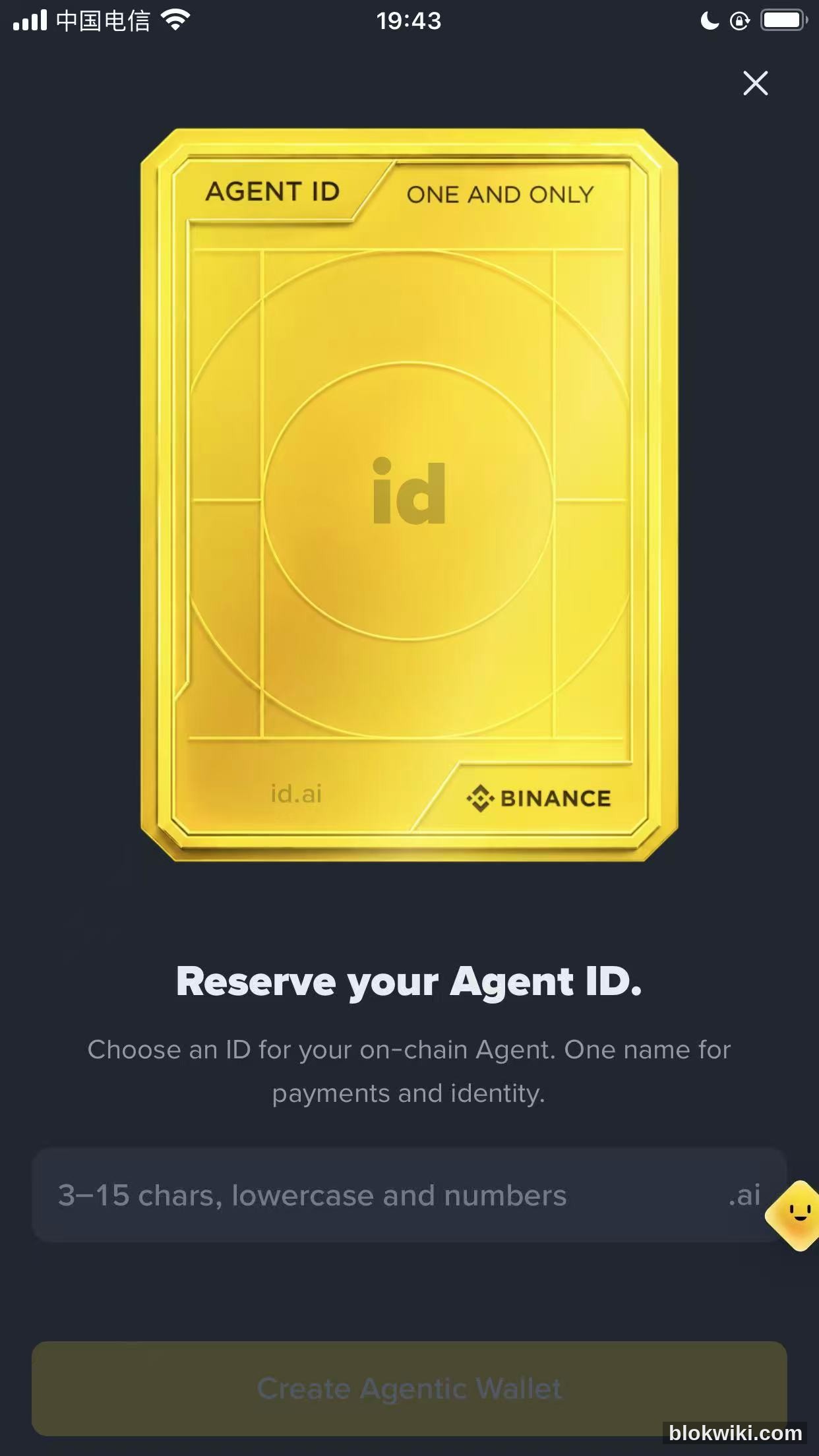
The next screen shows a large gold card marked AGENT ID / ONE AND ONLY, with yourname.ai and the Binance logo at the bottom. The input field has a fixed .ai suffix. The empty state says: 3–15 chars, lowercase and numbers.
Step 3: Pick a name and check availability
There are only three rules: length 3–15, characters limited to lowercase a–z and digits 0–9, and no spaces, uppercase letters, underscores or Chinese characters. Availability is checked in real time; if the name is free, the app says it is available and asks you to bind an Agentic Wallet.
Practical naming advice:
- Use your brand, a handle you already use, or a short abbreviation people can recognise;
- Short names are taken quickly, so prepare three options and try them in order;
- Avoid real names, phone numbers or birthdays — an Agent ID is public;
- Double-check the spelling: there is currently no rename option once claimed.
Step 4: Bind an Agentic Wallet
Once the name is available, tap Bind Agentic Wallet. If you already have one, you go straight to the binding confirmation. If not, the next step creates one for you. One Agent ID is linked to one Agentic Wallet address, and the linked address is displayed on the following screen.
Step 5: Read the AI consent notice before ticking the box
Tapping through opens an AI Notice and Consent dialog. The wording is long, but it comes down to four points:
- Agentic Wallet uses artificial intelligence to automate actions on your behalf and to provide information and recommendations;
- This includes automated decision-making that may significantly affect your account and transactions;
- AI outputs may be inaccurate, incomplete or unsuitable for your needs;
- Selecting “I agree” means you consent to your inputs, instructions and related data being processed to provide these AI features.
The Confirm button stays greyed out until you tick “I understand that Agentic Wallet uses AI and I agree to the processing of my data to provide AI-enabled features.”
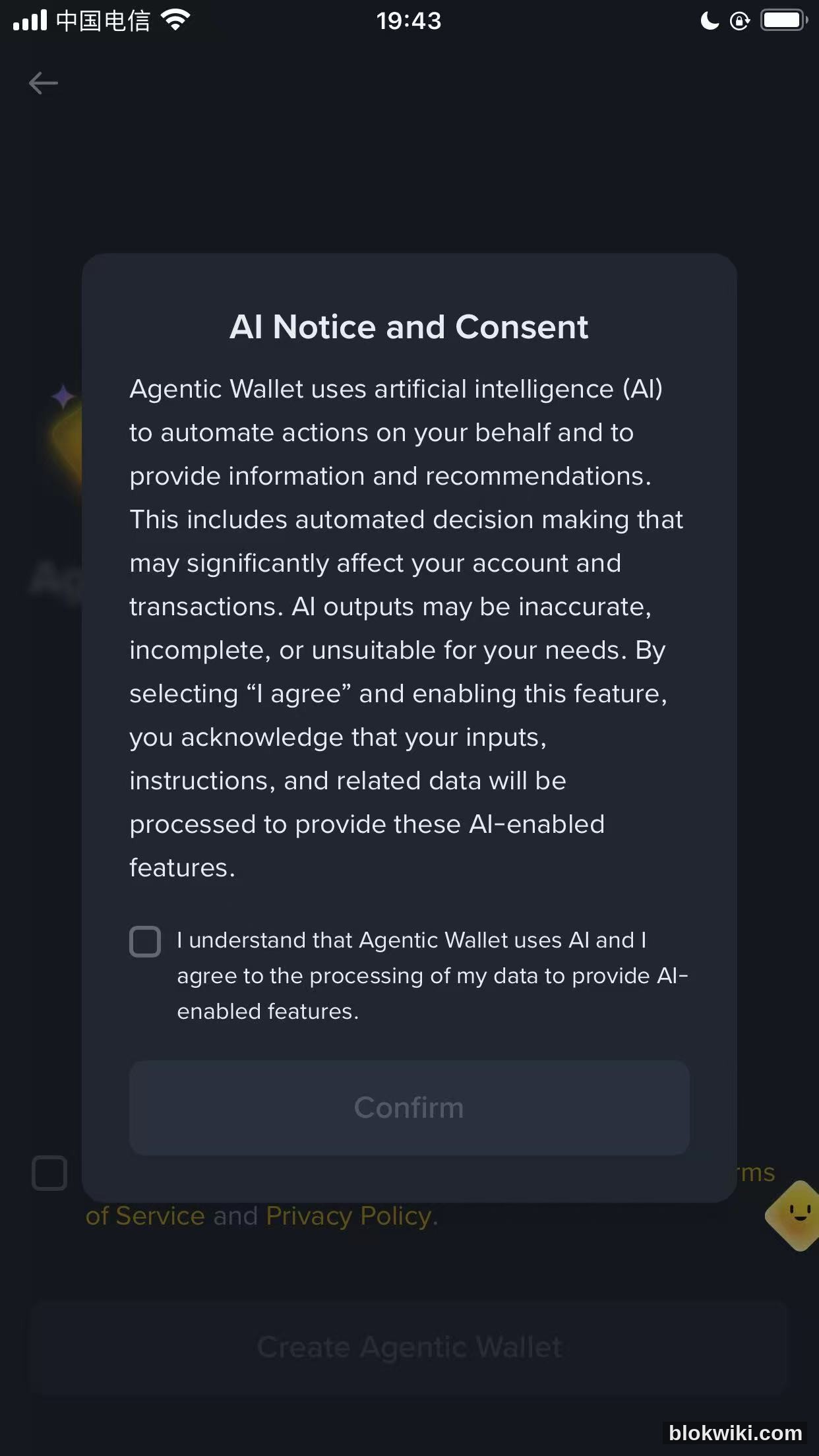
This is not a formality. It authorises an AI system to move your funds within a defined scope; the next step defines that scope more concretely.
Step 6: Create the Agentic Wallet and decide on Secure Auto Sign
The next screen creates the wallet. At the bottom there is a mandatory checkbox: enable Secure Auto Sign and accept the Terms of Service and Privacy Policy. Only then does Create Agentic Wallet become active.
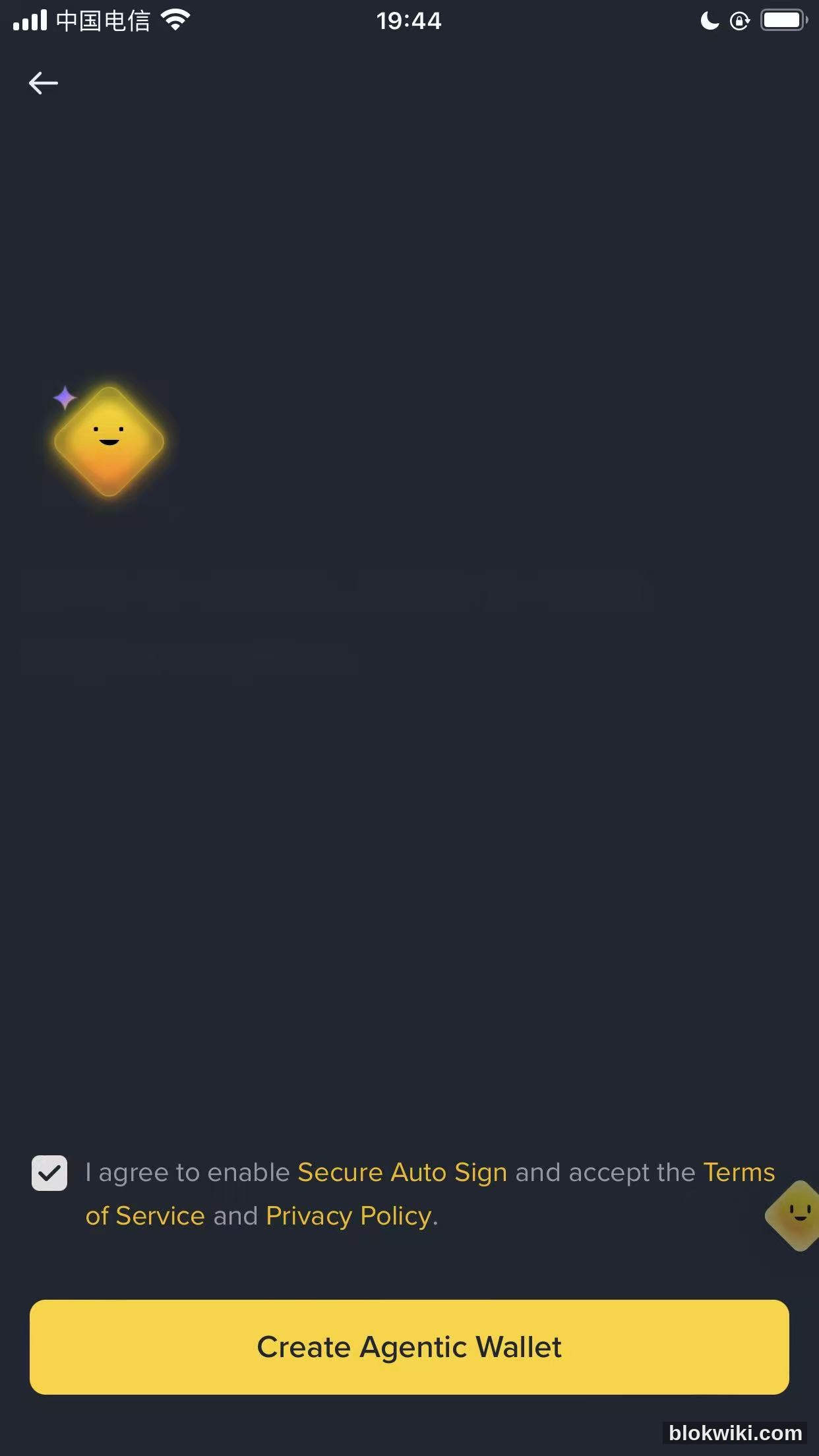
What Secure Auto Sign means: with it enabled, the AI can execute transactions within its limits without asking you to confirm each one. That convenience shifts the safety burden onto three controls:
- Spending caps: per-transaction and daily limits; anything above them requires manual approval;
- Token allowlist: only the tokens you list can be used;
- Address book: outgoing transfers can only go to saved addresses.
If you only want the Agent ID as a receiving name and do not plan to let an AI trade for you, tighten the auto-sign permissions in the Agentic Wallet settings after creation, and keep only a small balance there.
Step 7: Confirm the linked address and fund the BNB Chain gas
After binding, the “Claim your Agent ID” screen shows the address your name will be linked to (a long 0x address) and a notice: Minted on BNB Chain. Deposit at least 0.0001 BNB for gas. The button reads Deposit BNB.
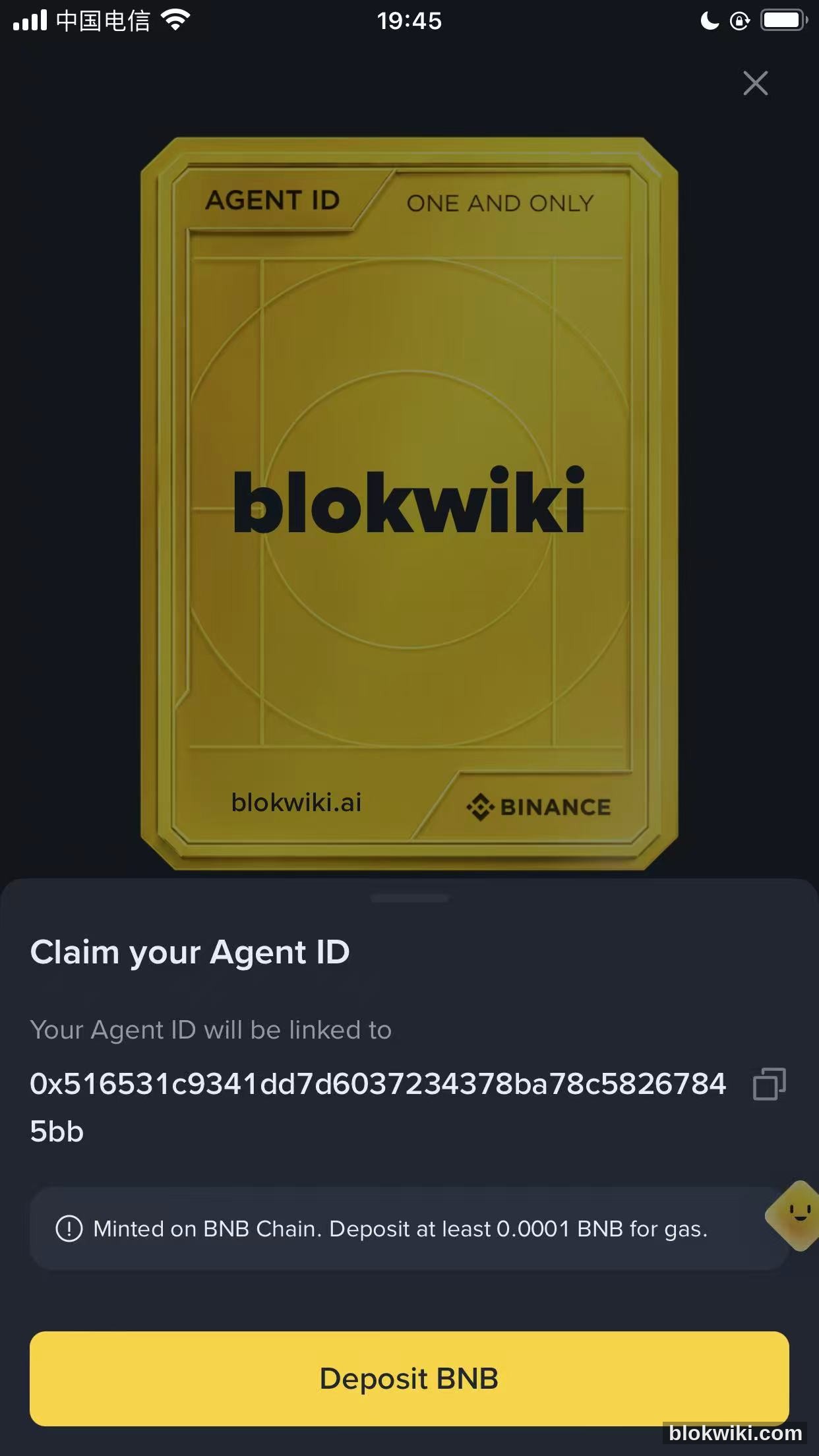
Why BNB Chain: the minting contract lives on BNB Chain, so minting is an on-chain transaction and requires gas. The 0.0001 BNB figure is the minimum shown in the app; actual network fees vary, so deposit a little extra to avoid a failed mint.
How to fund it: tap Deposit BNB and follow the in-app instructions, either transferring from your Binance account or sending from an external wallet. When sending on-chain, select BNB Smart Chain (BEP-20). Do not use Ethereum mainnet or another network, or the funds may be unrecoverable.
Step 8: Complete the mint
Once the gas arrives, return to the page and complete the mint. When it succeeds, the Agent ID is linked to your Agentic Wallet, and typing the name into the wallet's receive or send screen resolves it to the address. Menu locations vary slightly between app versions; follow what your app shows.
If the button stays disabled after funding: check that the BNB is on the correct chain and has actually arrived (look at the BNB Chain assets in the Agentic Wallet), then leave and reopen the page. Do not tap repeatedly, or you may initiate duplicate transactions.
Step 9: Send yourself a small test payment
Start with $1–2 worth of assets. Ask the sender to type yourname.ai into the address field of Binance Wallet, verify the resolved 0x address and the network, and only then confirm. Once that works, share the Agent ID with clients or friends for payments.
5. Using an Agent ID as a wallet address
Receiving
Share yourname.ai. The sender types it into Binance Wallet's transfer screen, where it resolves to the linked 0x address. The sender still has to select the right network (currently BNB Chain) and verify the resolved address.
Sending
Type yourname.ai in the address field, check the resolved address, network and amount, then sign. The name is only an alias; the resolved address is what actually determines where the funds go.
Three limits you must know
- Exchange withdrawals: most exchange withdrawal forms accept only 0x addresses, not .ai names. When withdrawing from an exchange, use the 0x form of the linked address, or withdraw to Binance Wallet first and send from there.
- Cross-chain: the Agent ID is minted on BNB Chain and resolves to a BNB Chain address. Do not assume it works on Solana, Base or Ethereum; confirm the network and address format with the recipient.
- External wallets: resolution currently works inside Binance Wallet. Support in other wallets depends on the provider. Before sending a .ai name to someone using MetaMask or another wallet, confirm they can resolve it.
6. Security: keep the AI on a short leash
- Separate balance: the Agentic Wallet is an isolated sub-wallet. Keep only day-to-day spending money there and hold the rest in a cold wallet or your main wallet.
- Spending caps: set per-transaction and daily limits so anything larger needs manual approval. Public reports mention separate daily caps for swaps, DeFi activity and x402 payments; the app is the authoritative source.
- Allowlists: use the token allowlist and address book so a manipulated agent cannot send funds to an unknown address.
- High-risk controls: keep protections against high-risk transactions (new contracts, unusual approvals) enabled. Do not remove every safeguard just to avoid confirmation taps.
- Privacy: an Agent ID is a public alias. Anyone who has it can look up the linked address and its on-chain history. Do not use your real name, phone number or birthday, and consider keeping a separate wallet for public payments.
- Seed phrase and private key: the Agent ID is not a private key and is safe to share. Your seed phrase and private key are not. Never give them to anyone, including “support agents” offering to activate your Agent ID.
7. Fees, availability and rules
| Item | Rule |
|---|---|
| Claim fee | Free during the launch period; future fees have not been announced |
| Minting gas | At least 0.0001 BNB on BNB Chain (per the in-app notice); actual network fees apply |
| Name rules | 3–15 characters; lowercase letters and digits only; fixed .ai suffix |
| Availability | First come, first served; popular short names are likely already taken |
| Linking | One Agent ID is linked to one Agentic Wallet address |
| Renaming | No rename option is currently visible; confirm spelling before claiming |
| Renewal / annual fee | Not announced; watch for official updates |
8. What the Agentic Wallet can do
The Agent ID is just the entry point; the capabilities sit in the Agentic Wallet, launched in April 2026 as an isolated wallet for AI:
- Check balances, transfer funds, place spot market and limit orders, manage orders and review trade history;
- A keyless design so the private key is not exposed directly to the AI;
- Supports BNB Smart Chain, Solana, Base and Ethereum at launch;
- MCP-compatible agent frameworks such as OpenClaw, Claude Code and Cursor can connect through Binance Skills Hub;
- Binance plans to make .ai identifiers interoperable across DeFi and MCP tools.
That also explains why Binance is handing out short IDs: when the party initiating a transaction is an AI rather than a person, a 42-character hex address is hard to verify and easy to get wrong. A readable name works better for both humans and machines.
9. FAQ
Does an Agent ID cost anything?
It is free during the launch period; you only pay BNB Chain minting gas (at least 0.0001 BNB). Any future fee will be announced officially.
Why can't I type uppercase letters or underscores?
The rules are 3–15 lowercase letters and digits, with a fixed .ai suffix. Uppercase, spaces, Chinese characters and symbols are not allowed.
What if my name is taken?
Pick another one, such as a variant with digits, an abbreviation or a brand prefix. Do not buy “rare IDs” from third parties; those deals have no official protection and are a common scam.
Can I claim without an Agentic Wallet?
Yes. The flow creates one for you, and you will need to accept the AI consent and Secure Auto Sign terms.
Can I claim first and add BNB later?
You cannot complete the mint without gas. The page requires at least 0.0001 BNB, so fund the wallet first and then return.
Can I rename it after claiming?
No rename option is currently visible. The name is printed on the card and linked to your address, so check the spelling carefully before claiming.
How is this different from a .bnb domain?
Both are address aliases, but they have different issuers, resolution scopes and purposes. Agent ID is issued by Binance Wallet, currently resolves inside Binance Wallet and is positioned for payments and AI agent identity; .bnb belongs to the SPACE ID BNB domain system. Do not treat them as interchangeable.
Can I use it as an exchange deposit address?
No. Exchange deposit and withdrawal forms generally accept only 0x addresses. Entering a .ai name may fail or, worse, send funds into a void. Use the 0x address.
Is an Agent ID safe?
The name itself is public information. The real risk comes from granting broad auto-sign permissions. Keep the balance small and use spending caps, allowlists and the address book.
Is it available in my country?
Availability depends on the Binance app in your region and local regulations. This article explains the feature; it is not a recommendation to use it.
10. Should you claim one now?
If you use Binance Wallet regularly, or plan to let an AI agent execute on-chain actions, an Agent ID is worth claiming now: it is free, first-come-first-served, and shorter names are harder to get. Just keep three things in mind:
- Treat it as a receiving name, not an investment — it has no price of its own;
- Keep only a small balance in the Agentic Wallet and tighten auto-sign permissions;
- Run a small test payment before sharing it, and confirm the recipient's wallet can resolve it and the network is correct.
To open a wallet first, use our Binance Wallet referral link; if you already have an account, just update the app. If KYC gives you trouble, start with our KYC troubleshooting guide.
Risk notice and affiliate disclosure: Crypto assets are highly volatile and you may lose your entire principal. This article is not investment advice. The rules, fees, daily limits, supported chains and resolution scope of Agent ID and Agentic Wallet may change between versions; always rely on what the Binance app displays and on official announcements. Verify the network and address before any cross-chain transfer, because sending to the wrong chain can cause irreversible loss. This article contains a Binance Wallet referral link (open Binance Wallet through our link); we may earn a commission if you register through it. It does not increase your costs and does not affect our conclusions.