Gate Card Application Guide 2026: Fees, Cashback and Safety
Applying for a Gate Card is free, but spending costs 0.9% in crypto conversion, 1% in FX fees and 2% at ATMs, while new users normally earn 1% cashbac…
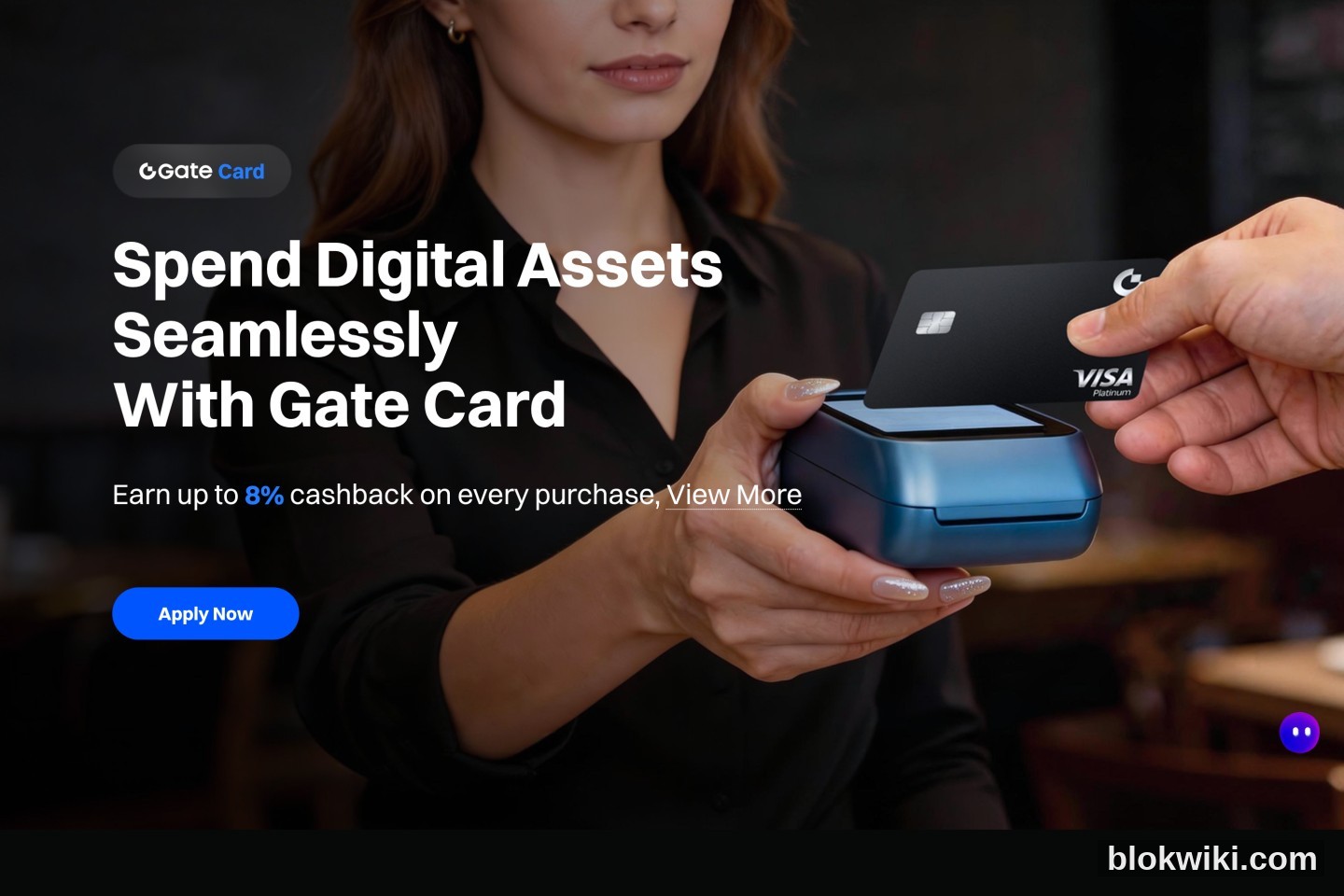
Gate Card is Gate's Visa crypto debit card. It lets you spend USDT, BTC, ETH or GT from your spot account or Gate Pay balance online, in stores, and at ATMs, with up to 8% cashback. It is not a credit card: there is no credit line and no repayment date. You are always spending your own assets.
This guide covers the rules that were still in force in October 2026: eligibility, the six-step application, the real fee schedule, cashback tiers and monthly caps, Apple Pay setup, declined-payment troubleshooting, and the security points most guides skip. Applying is free, but "free" only means no issuance, monthly or inactivity fee. The 0.9% conversion fee, 1% FX fee and ATM fee still apply when you spend.
Who it suits — and who it doesn't
It suits people who already have a verified Gate account and mainly pay for overseas subscriptions (ChatGPT, Claude, Netflix, App Store), cloud services, travel bookings, or small in-store purchases. Virtual cards are issued quickly, and Apple Pay / Google Pay support is relatively complete.
It does not suit anyone looking for credit or instalments (it is a debit card); anyone trying to move large sums across borders; anyone unwilling to complete KYC or unable to provide their own ID; or anyone expecting 8% cashback from day one. New users normally start at T0: 1% cashback, capped at 5 USDT per month.
Rule of thumb: treat it as a debit card that spends crypto, not as a rewards credit card. Keep only near-term spending on the card and leave long-term holdings in self-custody.
Free to apply is not free to use
Gate's Help Center is explicit: virtual card issuance, physical card issuance, the monthly fee and the inactivity fee are all free. These charges still apply when you use the card:
- Crypto conversion fee: 0.90% on transactions of $2 or more; $0.05 on transactions below $2.
- FX fee: 1.00% on non-USD transactions.
- ATM withdrawal: 2%.
- Chargeback: $30; card replacement: $25.
A quick example: a non-USD purchase worth $100 costs about $1.90 in conversion and FX fees. A T0 user earns 1% cashback, roughly $1, and the monthly cap is only 5 USDT, so the net cost is around 0.9%. The headline 8% does not cover everyday fees unless you have reached a high tier.
Before you apply: four things that will stop you
- Account and KYC: your Gate account must be registered, both email and phone must be linked, and identity verification must reach Level 2. Gate's official application guide lists linked email/phone plus completed KYC as step two.
- Matching ID: you must use the same ID document as your Gate Global KYC. Enter your name in pinyin exactly as it appears on the ID; First Name is your given name, Last Name is your family name.
- A real address: the address must match where you actually live. Some card types may require a qualifying proof of address issued within the last three months. "No proof of address" on the landing page does not mean every card and region waives it.
- An eligible region: your country or region must appear in the application page's list. If it does not, the card is not available there. Do not enter a false residence to unlock the option.
Fund a small test amount first, for example 15–20 USDT in your spot account. A virtual card is activated automatically once approved. A physical card ships to your KYC address; Gate's standard-card FAQ quotes 15–45 days, while the general FAQ says 7–45 days depending on local postal service.
The six-step application
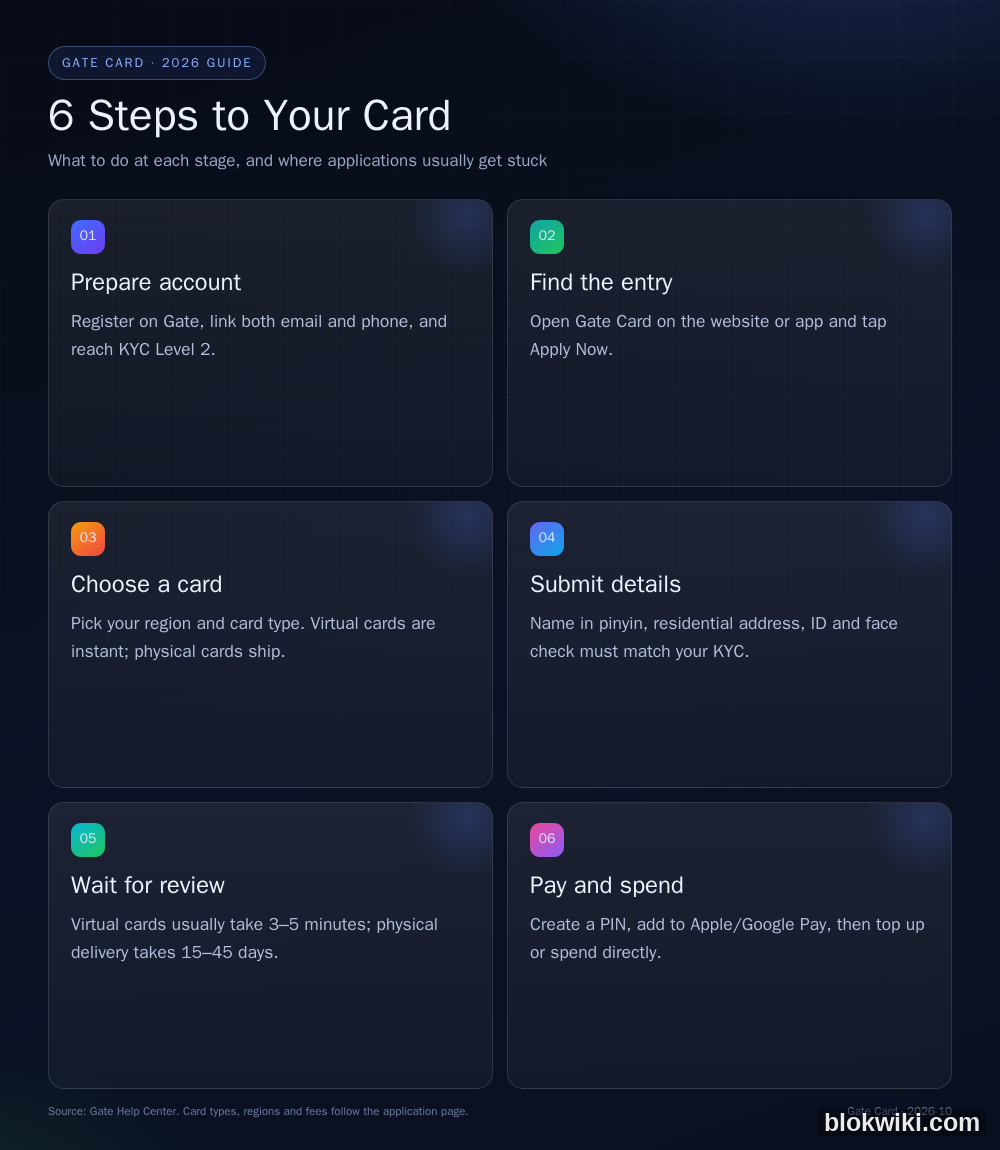
Step 1: Open the Gate Card page
On the web, log in to Gate and open Gate Card from Buy Crypto, or find it under Products in the footer. In the app, switch to Gate Pay and select Card from the bottom menu. If you are signed out, Apply Now redirects to the login page; when you arrive through a promotional domain, that login page will sit on the same domain. If you are not comfortable with that, open gate.com directly, sign in there, and return to the Card page.
Step 2: Choose region and card type
Select your place of residence, then choose a card. The Standard Card is a Visa; virtual cards are available immediately, while physical cards ship. Each user may hold one virtual and one physical card. Cashback tiers, fees and benefits differ between card types, so do not judge them all by the "up to 8%" headline.
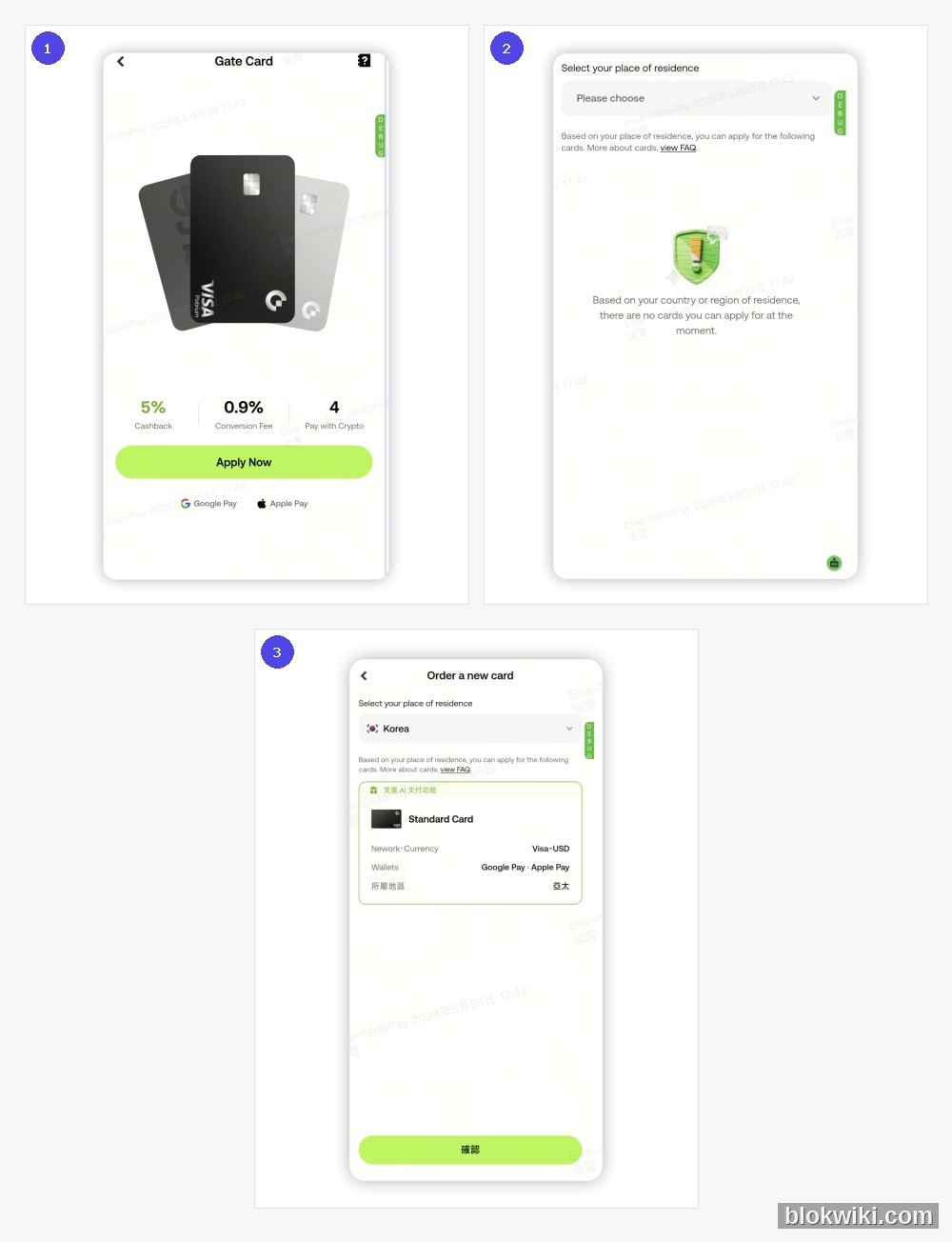
Step 3: Enter your details
Fill in your name, address, ID and face verification in order. Name, address and ID must match your KYC exactly. Enter the address in pinyin or the local language as the page requests; do not paste Chinese characters into a field that cannot validate them. Upload a complete, glare-free ID photo, remove hats and masks for the face check, and use even lighting.
Step 4: Submit for review
Virtual cards are usually reviewed in 3–5 minutes and appear in Gate Pay once approved. Physical cards wait for delivery and activation. Rejections usually involve mismatched details, an unsupported region or risk controls. Do not resubmit repeatedly; ask [email protected] for the reason first.
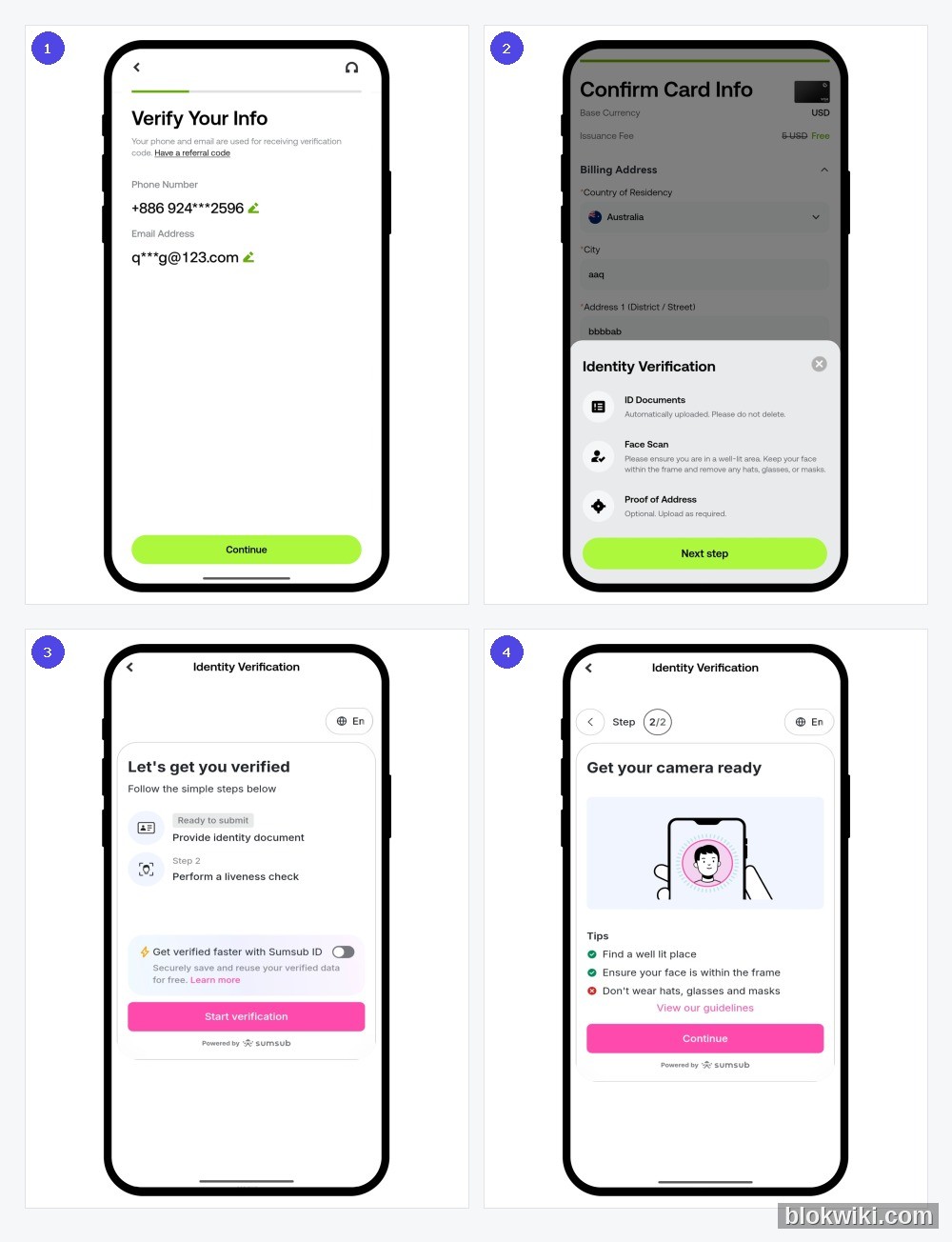
Step 5: Create a PIN and view the card
After approval, create a PIN in the card management page. Then tap View Details and complete verification by email, SMS or security key to see the full card number, expiry and CVV. Gate requires this check every time; it is a security feature, not friction for its own sake.
Step 6: Add to Apple Pay or Google Pay and spend
The Standard Card supports Apple Pay and Google Pay. On iPhone, open Wallet, tap "+", choose Debit or Credit Card, then scan the card or enter it manually. In Google Pay, open Wallet, tap "Wallet +", choose Payment Card and add the details. A small temporary authorisation may appear during setup and is released shortly. Some card types do not support Apple Pay; check the card page.
Fees and limits on the Standard Card
| Item | Fee / rule |
|---|---|
| Virtual card issuance | Free |
| Physical card issuance | Free |
| Monthly / inactivity fee | Free |
| Crypto conversion | 0.90% for transactions ≥ $2; $0.05 below $2 |
| FX fee (non-USD) | 1.00% |
| ATM withdrawal | 2% |
| Chargeback | $30 |
| Card replacement | $25 |
Spending limits are $50,000 per day and $990,000 per month across tiers T0–T4. ATM limits are $5,000 per day and 10 withdrawals; $15,000 per month and 100 withdrawals; $50,000 per year and 1,000 withdrawals; with a $5,000 cap per withdrawal. Limit increases can be requested through [email protected] and are subject to review.
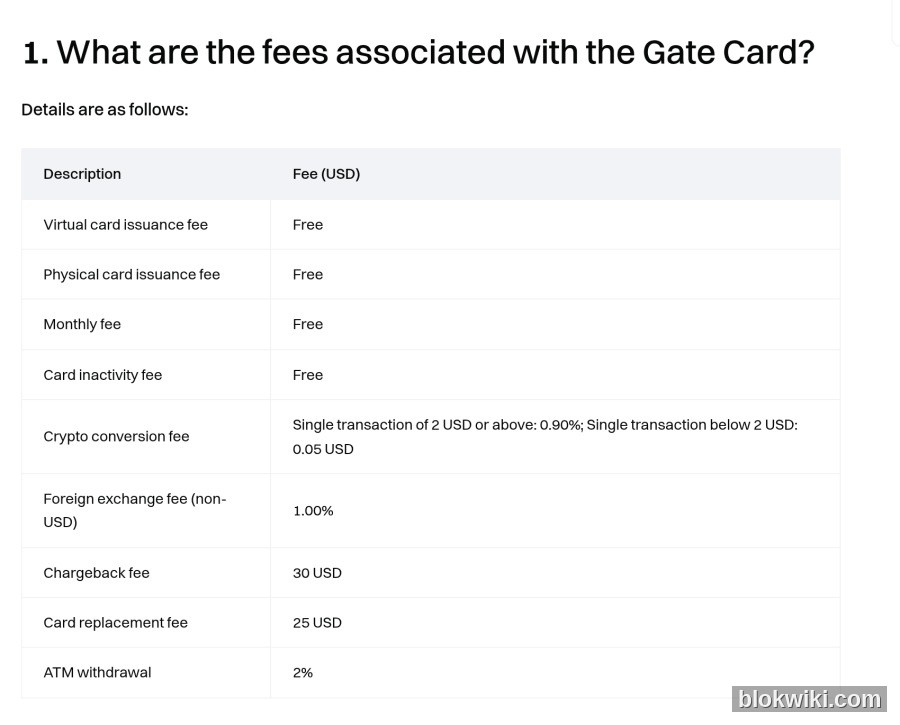
Note: the table above is for the Standard Card (Visa). Gate also offers Classic, Platinum, Signature and Select variants with different fees and benefits, and cards issued in regions such as the EEA may follow another schedule. Read the fees on the application page before confirming.
Cashback and points: 8% is a ceiling, not a starting rate
Cashback is paid in points. 100 points = 1 USDT, and points can be redeemed for USDT, GT and other assets. Points usually settle 2–3 days after the transaction, never expire, and can be redeemed manually from 50 points (0.5 USDT). Rates are tiered from T0 to T5:
| Tier | VIP level | Minimum monthly spend | Cashback | Monthly point cap | Monthly cashback cap |
|---|---|---|---|---|---|
| T0 | VIP 0–4 | 0 | 1.00% | 500 | 5 USDT |
| T1 | VIP 5–7 | $500 | 1.00% | 5,000 | 50 USDT |
| T2 | VIP 8 | $3,000 | 2.00% | 10,000 | 100 USDT |
| T3 | VIP 9 | $6,000 | 3.00% | 15,000 | 150 USDT |
| T4 | VIP 10–12 | $10,000 | 5.00% | 25,000 | 250 USDT |
| T5 | VIP 13–14 | $15,000 | 8.00% | 40,000 | 400 USDT |
New users are assigned a tier based on their VIP level at application: anyone below VIP 5 starts at T0. A higher tier unlocked by monthly spend takes effect the following calendar month. In practice, a typical new user earns 1%, capped at 5 USDT per month. To reach 5% or 8%, you need either the VIP level or $10,000–$15,000 in monthly card spending. Do not model the top tier as your default return.
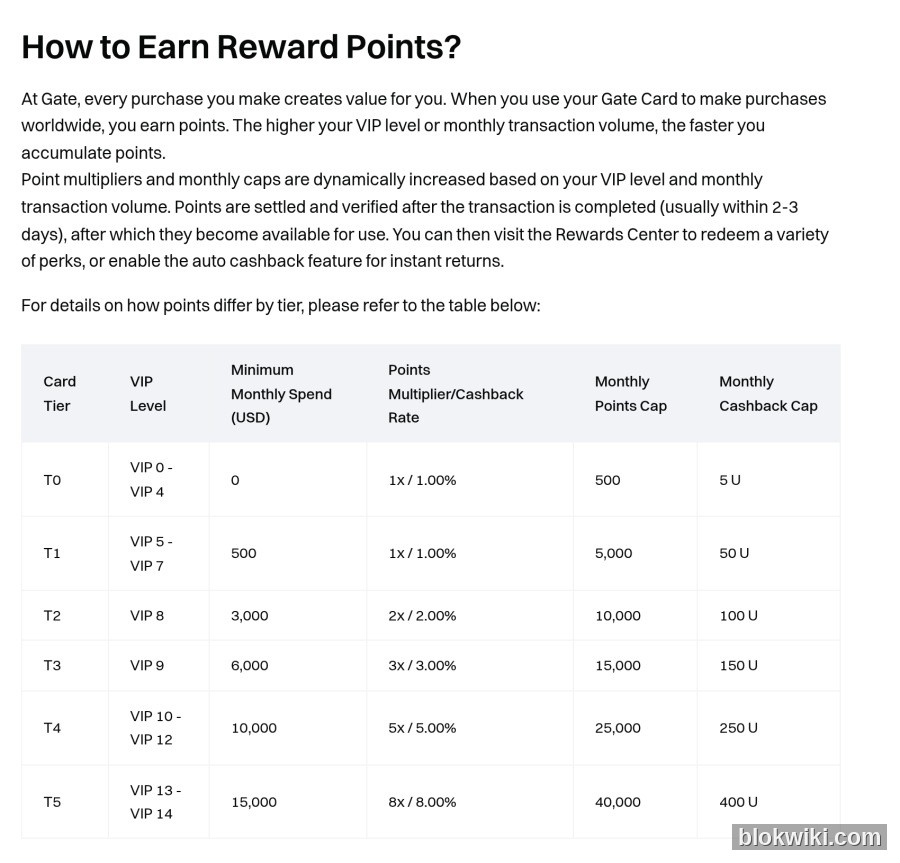
The following do not earn points: direct fiat payments, fees, management fees, top-ups and withdrawals; reversed or refunded orders; and certain merchant categories such as financial institutions, stored-value card top-ups, foreign currency, money orders, remittances, securities funding, insurance and gambling. Using the card to cash out or manufacture spending earns nothing and may trigger risk controls.
Referral rewards are separate. An invitee must spend at least $100 within 30 days of a successful application. The referrer receives 5 USDT and the invitee 2 USDT in cash coupons, plus up to 0.2% ongoing commission for 12 months. Cash coupons can only offset Gate Card spending or top-ups; they cannot be withdrawn or transferred. A referral code cannot be changed or added after submission, so check it before you confirm.
Top-ups, payments and refunds: there is no repayment step
Gate Card uses one of two funding models. In instant spending mode, you switch the funding account (Gate Pay, spot or Simple Earn) on the card page and the card debits the chosen asset when you pay. In top-up mode, you convert a balance into fiat and load it onto the card first. Which model you get depends on the card shown in your account.
Instant spending supports USDT, BTC, ETH and GT; top-up cards support more assets. Online payments require the card number, expiry and CVV. The first payment, or a higher-risk payment, triggers 3D Secure, with the code sent to your linked email or phone. Subscription services require 3DS on the first payment; later automatic renewals usually do not.
Refunds are initiated by the merchant and return to the card or the original payment path, commonly within 3–5 business days, depending on the merchant and issuer. Refunded or reversed orders do not earn points, and points already awarded may be clawed back. For duplicate charges, non-delivery or a charge after cancelling a subscription, contact the merchant first. If that fails, you can file a chargeback; the fee is $30 and the process can take months.
Security: eight rules
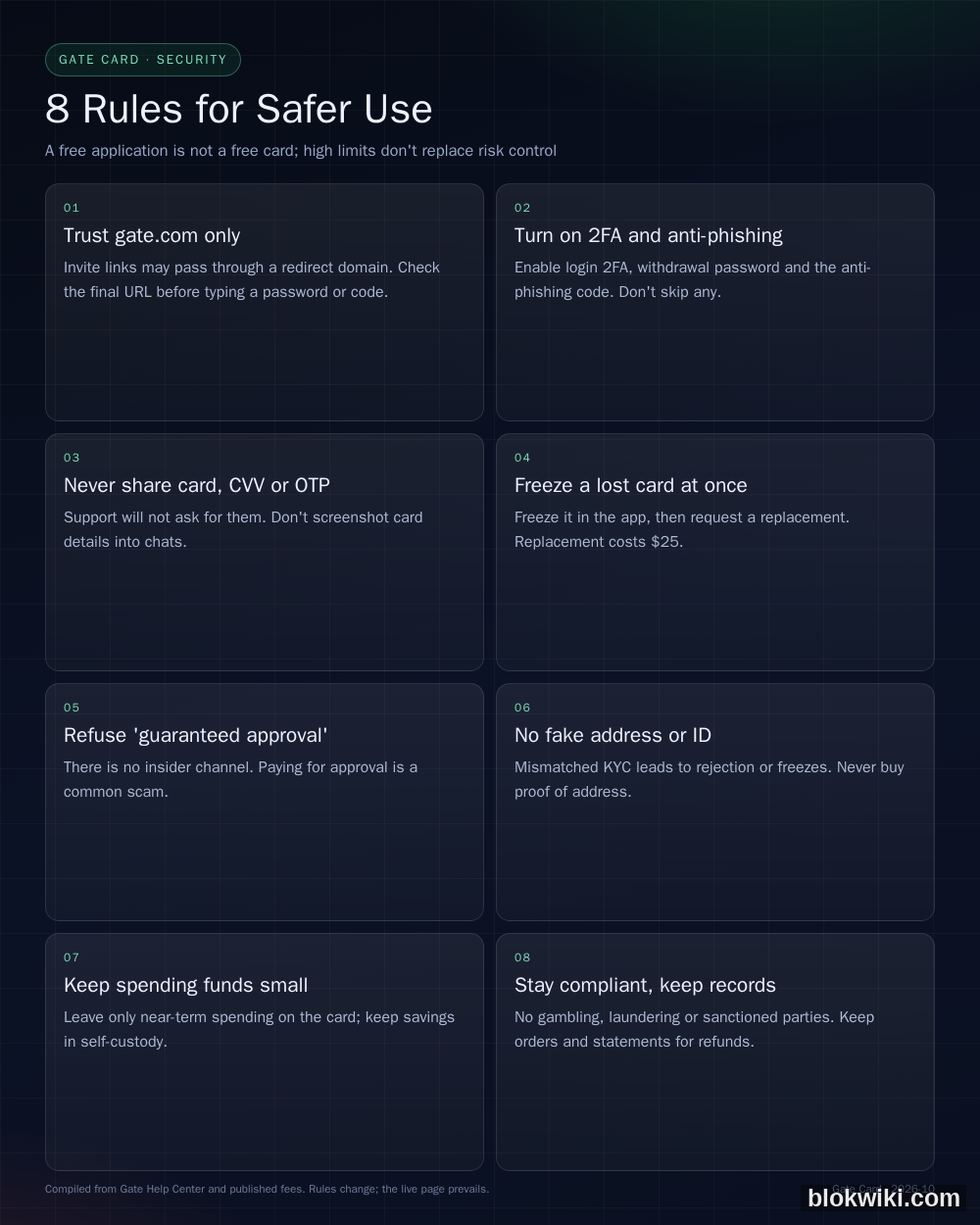
1. Trust gate.com only
The invitation link in this article lands on Gate's promotional domain app.zudanje.com, not gate.com. Before typing your Gate password, 2FA code or verification code, confirm the page is genuinely Gate's login screen; the safer option is to open gate.com directly, sign in there, and return to the Gate Card page to enter the code. Close any link that asks you to sign in to Gate on an unfamiliar page.
2. Enable 2FA, withdrawal password and anti-phishing code
Turn on all three. The anti-phishing code appears in legitimate Gate emails; an email without the correct code should be treated as phishing. Never reuse your Gate password with your email or another exchange, and review logged-in devices and authorisations regularly.
3. Never share the card number, CVV or OTP
Gate support will not ask for your password, 2FA code, full card number or CVV, and will not ask you to share your screen. Any private message offering to "raise your limit", "unfreeze your card" or "verify card details" is a scam. Do not post card screenshots in group chats or store them in notes; use a password manager if you must keep the details.
4. Freeze a lost or stolen card first
Use Freeze Account on the Gate Card page, then unfreeze if the card turns up. If it is gone, request a replacement for $25; the old card is permanently disabled. For unauthorised transactions, freeze immediately, contact [email protected], and keep statements and chat records. A replacement ships to your KYC address, so update that address if you move.
5. Refuse "guaranteed approval" and agents
There is no insider channel and no fee that guarantees approval. Agents who claim they can bypass regional restrictions, fake proof of address or spoof face verification usually collect your ID, face video and money, which can then be used for money laundering or loan fraud. If you are rejected, ask Gate support for the reason.
6. No fake address or ID
Name, address, ID and face must match. Someone else's ID or a purchased proof of address may pass initially, but a later review can freeze the account and block both funds and card. Proof of address must be a genuine document in your own name.
7. Keep the balance small
Leave only near-term spending on the card, for example 100–500 USDT, and keep larger balances in self-custody or a long-term account. If the card number leaks or the card is frozen, your loss is capped. Do not use this card as storage for your entire portfolio.
8. Stay compliant and keep records
Do not use Gate Card for gambling, money laundering or sanctioned transactions, and never rent, lend or sell the card. Crypto payments, foreign exchange and tax rules differ by country; check your local rules and declare what must be declared. Keep orders, statements and refund records, because they are the only evidence you will have in a dispute.
FAQ
Is Gate Card really free?
Applying is free, and virtual issuance, physical issuance, the monthly fee and the inactivity fee are all zero. Usage still costs 0.9% conversion, 1% FX, 2% at ATMs, $30 for a chargeback and $25 for a replacement. What is free is holding the card, not spending with it.
Can mainland Chinese residents apply?
Only the application page's country/region list can answer that. Gate says the card is available only in non-restricted regions, and eligibility depends on KYC, residence, issuer review and compliance requirements. Do not enter a false residence just to make an option appear.
Is proof of address required?
Some card types may require a qualifying proof of address issued within three months. "No proof of address" on the landing page is marketing copy, not a guarantee for every card and region. Follow the page for the card you actually select.
How long does approval take?
A virtual card usually takes 3–5 minutes. A physical card must then ship, typically 15–45 days and longer in remote areas. If it has not arrived after 45 days, the card page offers a resend option.
Why was my payment declined?
Check six things in order: the balance, the daily limit, whether the card is frozen, whether 3DS was completed, whether the billing address matches the card details, and whether the merchant category or region is restricted. Repeated wrong CVV or PIN entries can also freeze the card, so do not keep retrying.
Apple Pay will not add the card. What now?
Confirm the card type supports Apple Pay, check that your Apple ID region and card region do not conflict, and update Gate and your phone's OS. If the SMS code does not arrive, use email verification. If it still fails, contact [email protected] rather than adding the card repeatedly.
Why is my cashback only 1%?
New users start at T0: 1%, capped at 5 USDT per month. T2 and above require a higher VIP level or qualifying monthly spend, and the new tier starts the following month. The 8% rate is T5, which requires VIP 13–14 or $15,000 in monthly spending.
Can I withdraw cash at an ATM?
A physical card works at Visa ATMs. The fee is 2%, with a $5,000 daily limit and a maximum of 10 withdrawals. ATM withdrawals earn no points and may incur FX fees, so use them only when necessary.
What if the card is lost?
Freeze it in the app first, then request a replacement for $25 if it cannot be found. The old card is permanently disabled. If the card is only damaged, it may keep working until the replacement is activated.
Can I lend the card to someone else?
No. The card is tied to your identity, and renting, lending or selling it violates platform rules and can involve money laundering. You remain responsible for any freeze or legal consequence.
Troubleshooting: check these six items first
- Balance: in instant mode, check the spot or Gate Pay balance; in top-up mode, check the card balance. Top up a negative balance promptly, because a prolonged negative balance can permanently lock the card.
- Limits: single-transaction, daily and monthly limits, plus the ATM withdrawal count.
- Card status: frozen, newly replaced but not activated, or locked after repeated wrong PIN entries.
- 3DS: complete verification; if the code does not arrive, switch between email and SMS instead of tapping resend repeatedly.
- Billing address: must match the card details. Do not use a fake state or address to reduce tax; merchants may validate it and decline the payment.
- Merchant and region: financial, stored-value, remittance and gambling categories may be blocked, and a cross-border IP that conflicts with your KYC region can trigger risk controls.
If all six are fine and the payment still fails, save the time, amount, merchant name and error message and email [email protected]. Do not retry the same merchant a dozen times; that itself can trigger a freeze.
Risk and compliance notes
Gate Card is not a bank deposit and is not covered by deposit insurance. It depends on Gate and its issuing partners remaining operational and compliant, so platform risk, issuer risk and changes in regional policy all apply. Crypto prices are volatile, and spending crypto can mean selling at a bad moment. Fees, cashback tiers, limits and campaigns can change; the figures here are a snapshot of the official pages on 23 October 2026 and the live page prevails.
Mainland Chinese users should pay particular attention: crypto-related business, cross-border payments and foreign-exchange controls are each regulated separately. Gate Card is not a way around foreign-exchange controls, and "the card can be opened" does not mean "cross-border money movement is unrestricted". Tax obligations do not disappear because a crypto card was used.
If you do not yet have a Gate account, you can use this invitation link to reach the Gate Card application page; the invitation code is UwRBB1w. That link uses Gate's promotional domain app.zudanje.com, not gate.com. If you trust only the official site, go directly to gate.com/card and enter UwRBB1w on the application page to participate (subject to the campaign rules). For Gate access problems, see this Gate troubleshooting guide.
Risk notice and affiliate disclosure: Crypto assets are highly volatile and you may lose your entire principal. Gate Card limits, fees, cashback and regional availability can change at any time. This article is informational and is not investment, tax or legal advice. Read Gate's official fee page, user agreement and risk warning before applying, and confirm the rules that apply in your jurisdiction. This article contains affiliate links; we may earn a commission if you register through them, at no extra cost to you, and it does not affect the facts or conclusions above.